Static vs Dynamic QR Codes: Which One Should You Use?
One stores your data inside the pattern; the other stores a short link to a server. Here's what that means for cost, expiry, editing and privacy — and which to pick for each job.
In this article ▾
If you've ever searched for a QR code generator, you've probably seen the words static and dynamic — and maybe a free trial that turned into a subscription. The difference matters: it decides whether your printed code can expire, whether you can change it later, and who controls it. This guide explains both in plain language so you can choose the right one.
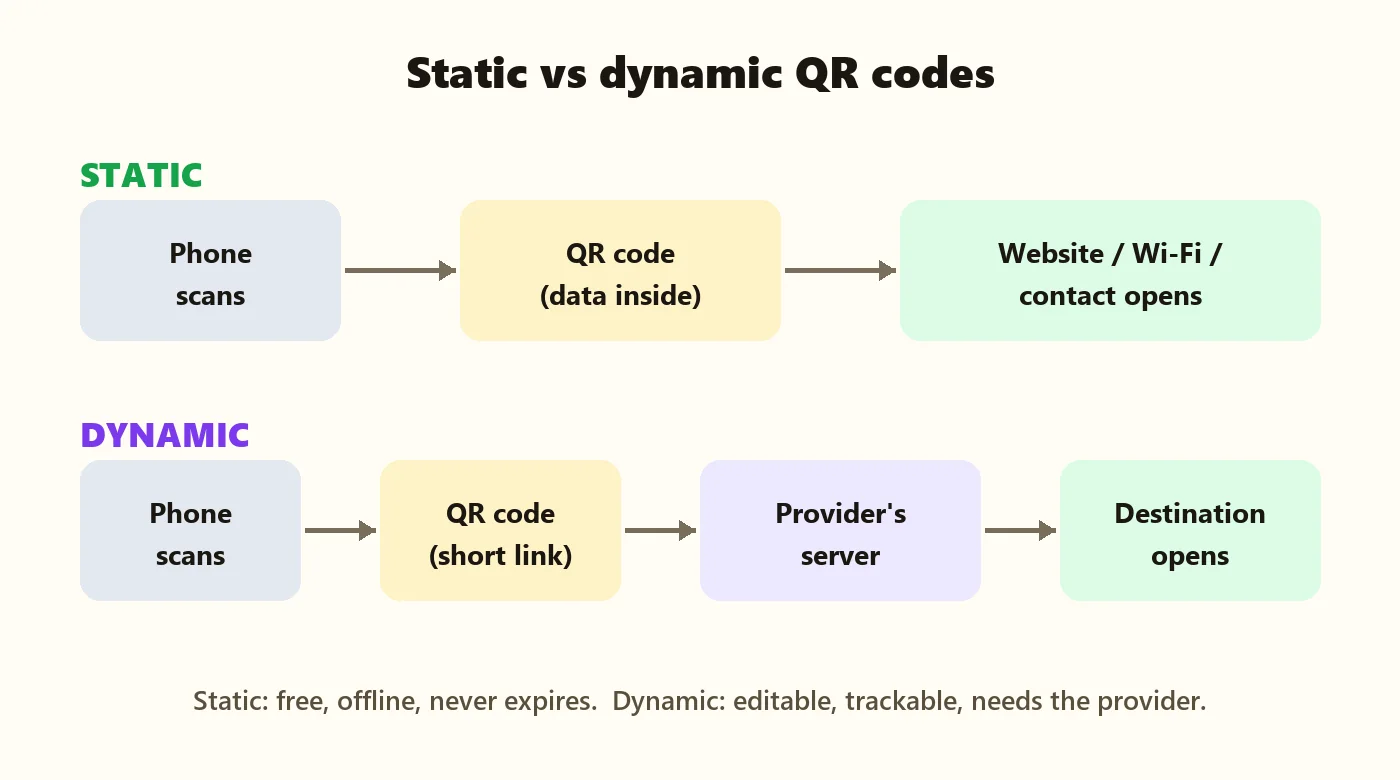
The difference in one picture
Static QR codes
A static QR code stores your content — a link, Wi-Fi details, a UPI ID, a calendar event or text — directly inside the pattern. The phone reads it and acts on it immediately. Nothing sits in between.
Dynamic QR codes
A dynamic QR code stores only a short link to a service run by the QR code provider. When scanned, the phone visits the provider's server, which then redirects to your real destination. Because the destination is stored on the server, the provider can let you change it — and can count the scans.
Side-by-side comparison
| Static QR code | Dynamic QR code | |
|---|---|---|
| Where the content lives | Inside the code | On the provider's server |
| Expires? | Never | Usually when the plan or trial ends |
| Works offline? | Yes, for text, Wi-Fi, contact and event data | No — needs the internet to reach the server |
| Edit after printing | No — make a new code | Yes |
| Scan statistics | No | Usually yes |
| Depends on a company | No | Yes — if the service shuts down, the code stops working |
| Cost | Free (on PaperBee) | Usually a monthly or yearly fee |
| Privacy | No third party sees the scan | The provider sees every scan |
Which one should you choose?
Choose static when the content won't change
- Wi-Fi details — see our Wi-Fi QR code guide.
- UPI payments — your UPI ID rarely changes. See UPI QR codes for shops.
- Vehicle and student contact codes — vehicle stickers and student ID QR codes.
- Event invitations — a calendar QR code for a fixed date.
- Your main website, Instagram or Google Maps location.
Choose a hosted or dynamic option when the content changes often
- A weekly menu — that's why PaperBee's hostel mess menu QR code is hosted and editable.
- Campaigns where you need scan statistics.
- Printed material that will be in use for years while the destination may move.
Why some “free” QR codes stop working
A common surprise: a business prints thousands of flyers with a QR code from a free trial, and months later the code shows a “subscription expired” page. That happens with dynamic codes, because the provider controls the redirect. Before printing, check which type you're getting. If the generator asks you to sign up to keep a code working, it's almost certainly dynamic.
PaperBee's QR code generator makes static codes: no account, no expiry and no watermark. The one hosted exception is the hostel menu, which we host for free because a menu needs editing every week.
Privacy: who sees the scan?
With a static code, scanning happens entirely between the code and the phone — no company is involved. With a dynamic code, every scan passes through the provider's server, which typically records when and roughly where it happened. That's useful for marketing, but it's worth knowing, especially for codes on student ID cards or personal items.
Does the type change how the code looks?
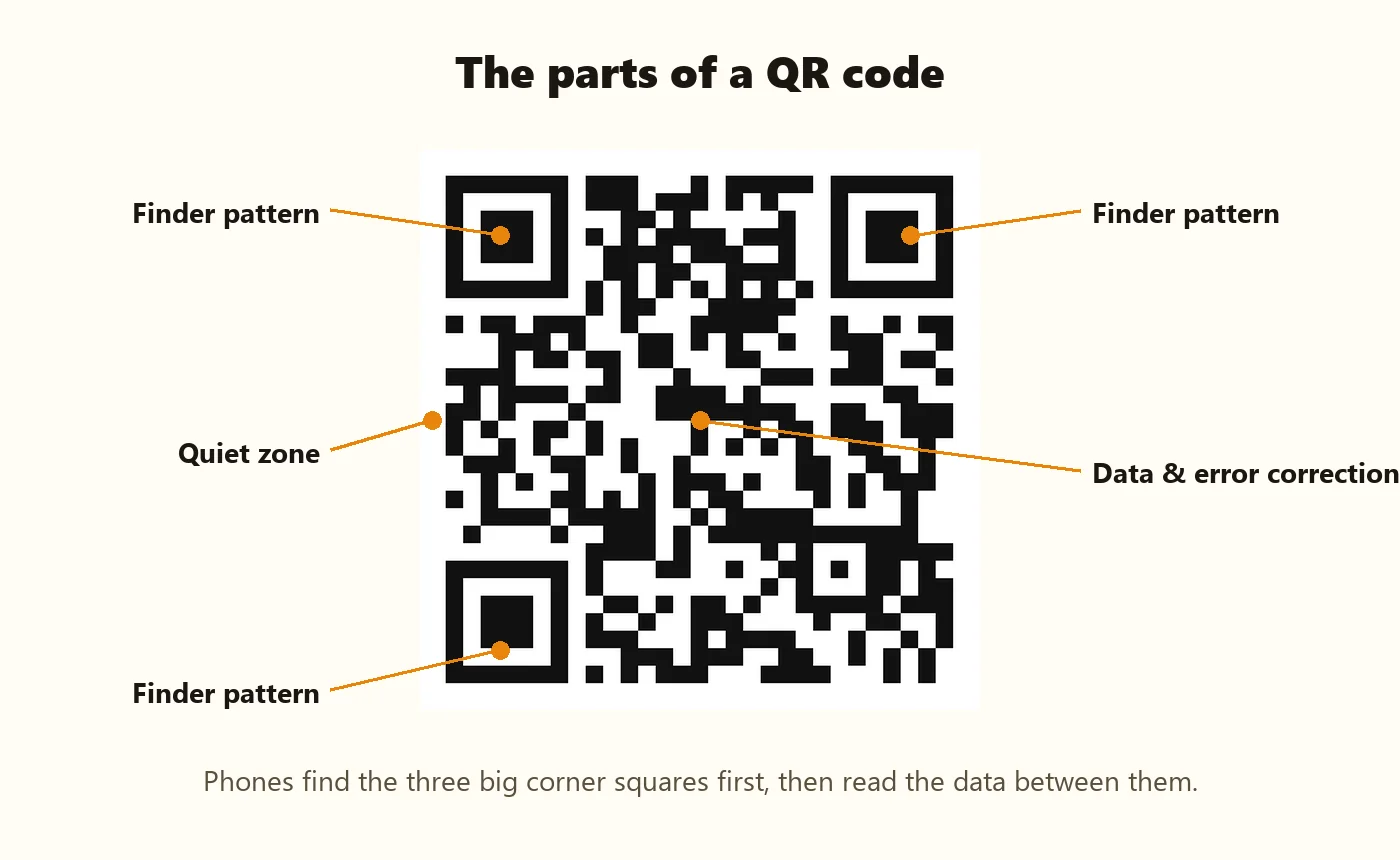
Slightly. A dynamic code always holds a short link, so it stays simple. A static code grows denser as you add more content — a long Wi-Fi password or a detailed event description adds more modules. Keep static content concise and print dense codes a little larger. Our printing guide has a size chart.
Summary
Static QR codes store your content inside the pattern: free, offline, private and permanent, but not editable. Dynamic QR codes store a short link: editable and trackable, but dependent on a provider and usually paid. For Wi-Fi, payments, contacts, events and most links, static is the simpler and safer choice. For content that changes every week, use a hosted option like the hostel menu QR code — or point a static code at a page you control.
Frequently asked questions
Do static QR codes expire?
No. The content is stored in the code itself, so a static QR code works as long as the content it points to exists.
Can I edit a static QR code?
No. To change it, create a new code — or make the code point to a page you control and edit that page instead.
Are dynamic QR codes free?
Some providers offer limited free plans or trials, but dynamic codes usually require a subscription to keep working.
Which type does PaperBee create?
Static codes for links, Wi-Fi, UPI, contacts, events and more — free with no expiry. The hostel menu is a free hosted page so it can be edited weekly.
Can I track scans of a static QR code?
Not from the code itself. If you link to your own website, your website's analytics can show visits from the QR code.
Written by the PaperBee Team
We build free tools that help schools, shops and organisers create professional documents — from QR codes to ID cards and certificates.