Get paid faster
Invoice with QR Code – Let Customers Pay by UPI in One Scan
Add a UPI payment QR code to your invoice. When customers scan it with any UPI app, the amount due and invoice number are filled in for them – so they pay the right amount, faster. Free, with 24 templates and PNG, JPG and PDF downloads.
- UPI payment QR
- Exact amount
- 24 templates
- Free
1Choose an invoice template
24 free templates · previews use your details
2Fill in your invoice
Invoice details
Your business
Bill to (customer)
Items (3)
- Item 1
- Item 2
- Item 3
Tax, discount & charges
GST
Payment details & UPI QR
Notes, terms & signature
3Preview & download
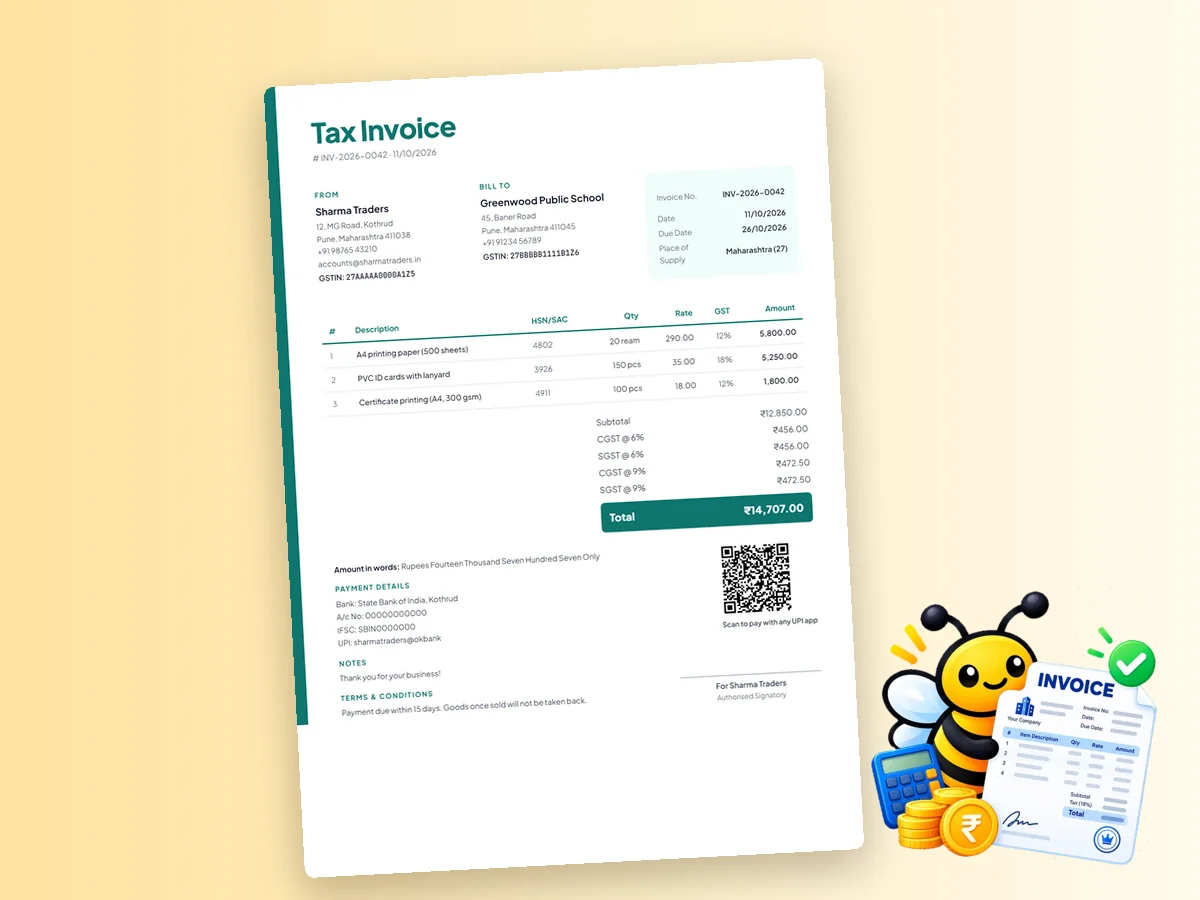
Modern Teal · Total ₹14,707.00Tax Invoice
# INV-2026-0042 · 11/10/2026
From
Sharma Traders
Bill To
Greenwood Public School
| Invoice No. | INV-2026-0042 |
| Date | 11/10/2026 |
| Due Date | 26/10/2026 |
| Place of Supply | Maharashtra (27) |
| # | Description | HSN/SAC | Qty | Rate | GST | Amount |
|---|---|---|---|---|---|---|
| 1 | A4 printing paper (500 sheets) | 4802 | 20 ream | 290.00 | 12% | 5,800.00 |
| 2 | PVC ID cards with lanyard | 3926 | 150 pcs | 35.00 | 18% | 5,250.00 |
| 3 | Certificate printing (A4, 300 gsm) | 4911 | 100 pcs | 18.00 | 12% | 1,800.00 |
Amount in words: Rupees Fourteen Thousand Seven Hundred Seven Only
Payment details
Notes
Terms & conditions
Scan to pay with any UPI app
Authorised Signatory
Free · No sign-up · No watermark · Made in your browser – your invoice data is never uploaded.
Tip: in the print dialog choose Save as PDF for a PDF invoice.
More invoice makers
Need a Different Kind of Invoice?
Every page has the same 24 templates, GST maths and free downloads – each one starts with the right settings for that invoice type.
Invoice Maker
All 24 templates – GST, non-GST, proforma and more.
GST Invoice Maker
Tax invoice with GSTIN, HSN/SAC, CGST + SGST or IGST.
Proforma Invoice
A quote-style invoice for advances, orders and exports.
Invoice Bill Format
Simple invoice bill formats for shops and services.
Invoice Format & Templates
24 free invoice formats to download as PDF or image.
Non-GST Invoice
Invoice format without GST for unregistered businesses.
How it works
How to Make a Invoice with QR Code Online in 3 Steps
- 1
Choose a template
Pick one of 24 invoice templates – every preview already shows your details.
- 2
Fill in your invoice
Add your business, customer and items. GST, discount, round-off and the amount in words are calculated for you.
- 3
Download or print
Download as PNG or JPG, or choose Print / Save PDF. Your draft is saved on this device.
Payment QR codes
How a UPI QR Code on Your Invoice Works
A QR code on an invoice removes the most common payment mistakes: wrong UPI ID, wrong amount, or no reference. PaperBee builds the QR from your UPI ID, your business name, the invoice total and the invoice number as the payment note. The customer scans, checks your name and pays.
How to add a UPI QR code
- Open Payment details & UPI QR in the editor.
- Enter your UPI ID (for example yourname@okbank).
- Tick Print a UPI QR code for the amount due.
- Download the invoice – the QR code appears next to the signature.
Payment QR vs e-invoice QR code
These are two different things. The e-invoice QR code is a signed code issued by the government's Invoice Registration Portal (with an IRN) for businesses above the e-invoicing turnover limit. PaperBee doesn't generate that. The QR code PaperBee adds is a payment QR – it helps your customer pay you by UPI and works on any invoice.
| UPI payment QR (PaperBee) | E-invoice QR (IRP) | |
|---|---|---|
| Purpose | Collect payment by UPI | Proof the invoice is registered |
| Who generates it | You, from your UPI ID | Government Invoice Registration Portal |
| Who needs it | Anyone who wants faster payment | Businesses above the e-invoicing limit |
More QR codes for your business
Need a standalone payment QR for your counter? Make one with the free UPI QR code generator and read our guide to UPI QR codes for shops.
Why add a payment QR code to invoices?
- Fewer errors – the UPI ID and amount are filled in automatically, so customers don't mistype them.
- Faster payment – customers can pay the moment they open the invoice on WhatsApp or see it printed.
- Easy reconciliation – the invoice number travels with the payment as the note, so you know which bill was paid.
- Works with every UPI app – Google Pay, PhonePe, Paytm, BHIM and bank apps all read the same standard QR.
Where the QR code appears
The QR code is printed beside the signature area, above “Scan to pay with any UPI app”. It updates automatically whenever the total changes, so it always matches the final amount on the invoice. If you'd rather not include an amount, remove the QR and add your UPI ID as text under payment details instead.
Best practices for invoice QR codes
- Use the UPI ID linked to your business bank account, not a personal one.
- Keep the invoice number as the payment note so every payment is easy to match.
- Download a high-quality PNG or PDF – a blurry QR code may not scan.
- On printed invoices, keep the QR code at least 2.5 cm wide.
- Send a fresh invoice if the amount changes; the old QR code contains the old amount.
You can also print a standalone counter QR code with the UPI QR code generator for walk-in customers.
Why PaperBee
Why Make Invoices with PaperBee
24 professional templates
Classic, modern, minimal, bold, corporate and elegant – each in four colours.
Maths done for you
GST split, discount, round-off and the amount in words, calculated as you type.
Private & no sign-up
Made in your browser. Your invoice data is never uploaded.
Download & share
PNG and JPG for WhatsApp, or print and save as PDF.
FAQ
Invoice with QR Code – Frequently Asked Questions
Which apps can scan the invoice QR code?
Any UPI app – Google Pay, PhonePe, Paytm, BHIM and bank apps – can scan it.
Does the QR code include the amount?
Yes. It includes the invoice total and uses the invoice number as the payment note.
Is this the GST e-invoice QR code?
No. The e-invoice QR comes from the government's Invoice Registration Portal. PaperBee adds a UPI payment QR code.
Does PaperBee handle the payment?
No. The money goes directly from your customer's UPI app to your UPI ID. PaperBee never handles payments.
Is it free?
Yes. Adding a UPI QR code to your invoice is free.
What if my customer wants to pay a different amount?
The QR code includes the invoice total. For part-payments, share your UPI ID separately or make a standalone UPI QR code without an amount using the QR code generator.
Can I add a QR code to a non-GST invoice?
Yes. The UPI payment QR works on every invoice type – GST, non-GST, proforma or a simple bill.
Ready to Create Your Documents?
Join thousands of users who trust PaperBee for their document needs.