Free invoice templates
Invoice Format – 24 Free Templates to Fill and Download
Browse 24 professional invoice formats in six styles – classic, modern, minimal, bold, corporate and elegant. Every template previews your own details instantly, and you can download the finished invoice as a PDF, PNG or JPG. Free, no sign-up.
- 24 designs
- 6 styles
- PDF download
- Free
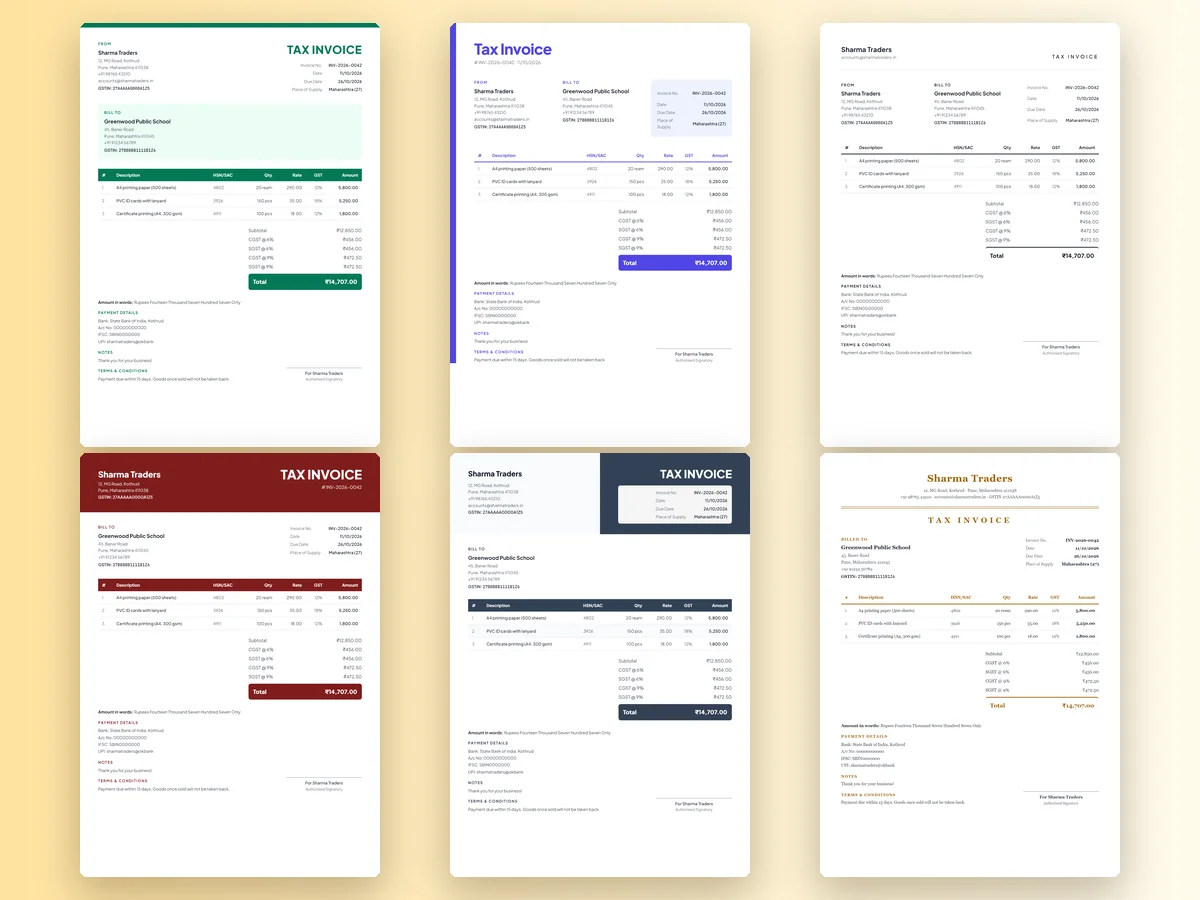
1Choose an invoice template
24 free templates · previews use your details
2Fill in your invoice
Invoice details
Your business
Bill to (customer)
Items (3)
- Item 1
- Item 2
- Item 3
Tax, discount & charges
GST
Payment details & UPI QR
Notes, terms & signature
3Preview & download
Minimal Black · Total ₹14,707.00Sharma Traders
accounts@sharmatraders.in
Invoice
From
Sharma Traders
Bill To
Greenwood Public School
| Invoice No. | INV-2026-0042 |
| Date | 11/10/2026 |
| Due Date | 26/10/2026 |
| Place of Supply | Maharashtra (27) |
| # | Description | HSN/SAC | Qty | Rate | GST | Amount |
|---|---|---|---|---|---|---|
| 1 | A4 printing paper (500 sheets) | 4802 | 20 ream | 290.00 | 12% | 5,800.00 |
| 2 | PVC ID cards with lanyard | 3926 | 150 pcs | 35.00 | 18% | 5,250.00 |
| 3 | Certificate printing (A4, 300 gsm) | 4911 | 100 pcs | 18.00 | 12% | 1,800.00 |
Amount in words: Rupees Fourteen Thousand Seven Hundred Seven Only
Payment details
Notes
Terms & conditions
Authorised Signatory
Free · No sign-up · No watermark · Made in your browser – your invoice data is never uploaded.
Tip: in the print dialog choose Save as PDF for a PDF invoice.
More invoice makers
Need a Different Kind of Invoice?
Every page has the same 24 templates, GST maths and free downloads – each one starts with the right settings for that invoice type.
Invoice Maker
All 24 templates – GST, non-GST, proforma and more.
GST Invoice Maker
Tax invoice with GSTIN, HSN/SAC, CGST + SGST or IGST.
Proforma Invoice
A quote-style invoice for advances, orders and exports.
Invoice Bill Format
Simple invoice bill formats for shops and services.
Invoice with QR Code
Add a UPI payment QR so customers pay in one scan.
Non-GST Invoice
Invoice format without GST for unregistered businesses.
How it works
How to Make a Invoice Format & Templates Online in 3 Steps
- 1
Choose a template
Pick one of 24 invoice templates – every preview already shows your details.
- 2
Fill in your invoice
Add your business, customer and items. GST, discount, round-off and the amount in words are calculated for you.
- 3
Download or print
Download as PNG or JPG, or choose Print / Save PDF. Your draft is saved on this device.
Choosing an invoice format
Which Invoice Format Should You Use?
An invoice format is more than decoration. The right layout makes the important things – what's owed, by when, and how to pay – easy to find, which means fewer follow-up calls and faster payment. PaperBee's 24 templates come in six styles, each in four colours.
| Style | Looks like | Good for |
|---|---|---|
| Classic | Colour band at the top, coloured table header | GST tax invoices, retail, wholesale |
| Modern | Side stripe and a large title | Freelancers, services, events |
| Minimal | Clean lines and lots of white space | Consultants, IT, tutors |
| Bold | Full-colour header with your name | Proforma invoices, quotations, contractors |
| Corporate | Two-tone header and striped rows | Companies, agencies, logistics |
| Elegant | Serif type, centred, double rules | Boutiques, hotels, restaurants, clinics |
PDF, PNG or JPG?
- PDF – best for email, accounting records and printing. Use Print / Save PDF and choose Save as PDF.
- PNG – crisp image for WhatsApp and messaging apps.
- JPG – smaller file, handy for quick sharing.
Tips for a professional invoice
- Use the same template for every invoice so customers recognise your bills.
- Add your logo and brand colour.
- Keep item descriptions short and specific.
- Always include a due date and clear payment details.
- Number invoices consecutively, for example INV/2026-27/001.
Need GST fields? Start from the GST invoice format. Sending a quote first? Use the proforma invoice.
What makes an invoice format professional
Customers judge a business partly by its paperwork. A professional invoice format has consistent alignment, readable fonts, a clear hierarchy (who it's from, who it's to, what's owed) and enough white space that nothing feels crowded. All 24 PaperBee templates follow the same structure underneath, so you can switch designs at any time without retyping anything.
Invoice format example
| # | Description | Qty | Rate (₹) | Amount (₹) |
|---|---|---|---|---|
| 1 | A4 printing paper (500 sheets) | 20 ream | 290.00 | 5,800.00 |
| 2 | PVC ID cards with lanyard | 150 pcs | 35.00 | 5,250.00 |
| 3 | Certificate printing (A4, 300 gsm) | 100 pcs | 18.00 | 1,800.00 |
| Subtotal | 12,850.00 |
With GST at 12% on the paper and certificates and 18% on the ID cards, the invoice adds ₹912 and ₹945 of tax – split equally into CGST and SGST for a sale within the state – for a total of ₹14,707. That's exactly the sample invoice the templates start with, so you can see every format with realistic numbers.
Matching your brand
- Pick the colour theme closest to your logo – navy, green, red, honey, indigo, teal, rose, orange, plum and more.
- Upload your logo; it appears in the header of every layout.
- Use the same template for every invoice so repeat customers recognise you instantly.
Invoice format checklist
- Business name, address, contact details and GSTIN (if registered).
- Customer name and address, with their GSTIN for B2B GST invoices.
- Unique invoice number, invoice date and due date.
- Item description, HSN/SAC (for GST), quantity, rate and amount.
- Subtotal, discount, taxes, round-off and the total in figures and words.
- Bank or UPI payment details, terms and an authorised signatory.
Every PaperBee template already has a place for each of these, so you only need to type the values – the layout, totals and amount in words are handled for you.
Why PaperBee
Why Make Invoices with PaperBee
24 professional templates
Classic, modern, minimal, bold, corporate and elegant – each in four colours.
Maths done for you
GST split, discount, round-off and the amount in words, calculated as you type.
Private & no sign-up
Made in your browser. Your invoice data is never uploaded.
Download & share
PNG and JPG for WhatsApp, or print and save as PDF.
FAQ
Invoice Format & Templates – Frequently Asked Questions
Are the invoice templates free?
Yes. All 24 invoice formats are free to use and download, with no watermark.
Can I download an invoice format as PDF?
Yes. Fill in the template and choose “Print / Save PDF”, then “Save as PDF” in the print dialog.
Can I change the colours?
Each style comes in four colour themes. Pick the one closest to your brand.
Can I use these templates for GST invoices?
Yes. Every template supports GSTIN, HSN/SAC and CGST + SGST or IGST.
Do I need design software?
No. Everything happens in your browser – no Word, Excel or design tools.
Which invoice format is best for a small business?
A clean Classic or Minimal template works for most small businesses – it keeps the totals and payment details easy to find. Add your logo and use the same template every time.
Can I switch to a different invoice format after filling it in?
Yes. Your details stay the same when you change templates, so you can try several designs and keep the one you like.
Do the templates work for international clients?
Yes. Choose USD, EUR, GBP, AED or SGD under Invoice details and set GST to “No GST” – the totals and amount in words switch to that currency.

Ready to Create Your Documents?
Join thousands of users who trust PaperBee for their document needs.