Free invoice bill maker
Invoice Bill Format – Make a Professional Bill Online
Skip the Word and Excel bill formats. Choose one of 24 clean invoice bill designs, type your items, and the totals, GST and amount in words are filled in automatically. Download a neat bill as PNG or JPG for WhatsApp, or save it as a PDF – free, no sign-up.
- No Word or Excel
- Auto totals
- WhatsApp-ready
- Free
1Choose an invoice template
24 free templates · previews use your details
2Fill in your invoice
Invoice details
Your business
Bill to (customer)
Items (3)
- Item 1
- Item 2
- Item 3
Tax, discount & charges
GST
Payment details & UPI QR
Notes, terms & signature
3Preview & download
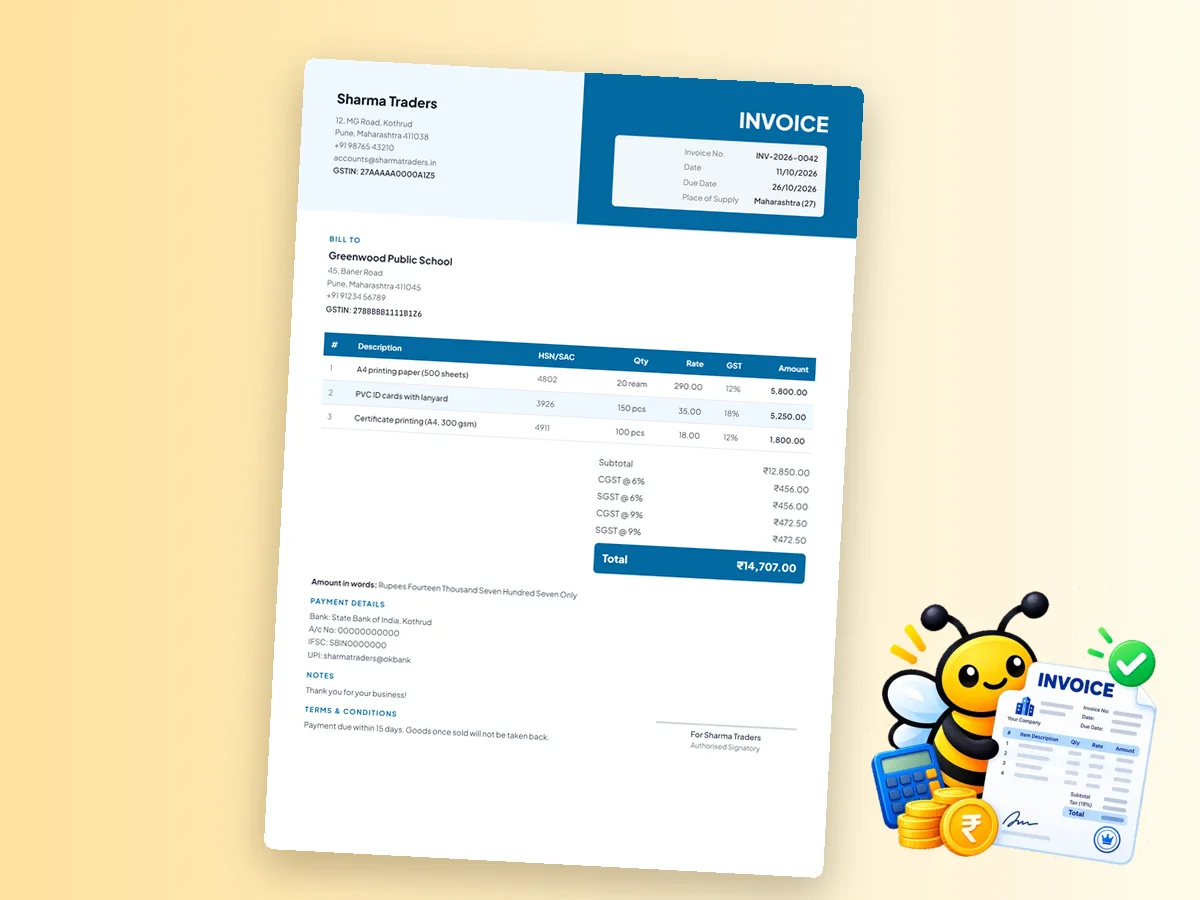
Corporate Blue · Total ₹14,707.00Sharma Traders
Invoice
| Invoice No. | INV-2026-0042 |
| Date | 11/10/2026 |
| Due Date | 26/10/2026 |
| Place of Supply | Maharashtra (27) |
Bill To
Greenwood Public School
| # | Description | HSN/SAC | Qty | Rate | GST | Amount |
|---|---|---|---|---|---|---|
| 1 | A4 printing paper (500 sheets) | 4802 | 20 ream | 290.00 | 12% | 5,800.00 |
| 2 | PVC ID cards with lanyard | 3926 | 150 pcs | 35.00 | 18% | 5,250.00 |
| 3 | Certificate printing (A4, 300 gsm) | 4911 | 100 pcs | 18.00 | 12% | 1,800.00 |
Amount in words: Rupees Fourteen Thousand Seven Hundred Seven Only
Payment details
Notes
Terms & conditions
Authorised Signatory
Free · No sign-up · No watermark · Made in your browser – your invoice data is never uploaded.
Tip: in the print dialog choose Save as PDF for a PDF invoice.
More invoice makers
Need a Different Kind of Invoice?
Every page has the same 24 templates, GST maths and free downloads – each one starts with the right settings for that invoice type.
Invoice Maker
All 24 templates – GST, non-GST, proforma and more.
GST Invoice Maker
Tax invoice with GSTIN, HSN/SAC, CGST + SGST or IGST.
Proforma Invoice
A quote-style invoice for advances, orders and exports.
Invoice Format & Templates
24 free invoice formats to download as PDF or image.
Invoice with QR Code
Add a UPI payment QR so customers pay in one scan.
Non-GST Invoice
Invoice format without GST for unregistered businesses.
How it works
How to Make a Invoice Bill Format Online in 3 Steps
- 1
Choose a template
Pick one of 24 invoice templates – every preview already shows your details.
- 2
Fill in your invoice
Add your business, customer and items. GST, discount, round-off and the amount in words are calculated for you.
- 3
Download or print
Download as PNG or JPG, or choose Print / Save PDF. Your draft is saved on this device.
Bill format guide
A Better Invoice Bill Format Than Word or Excel
Millions of small businesses still make bills in Word or Excel – searching for an “invoice bill format in Word” or “invoice format in Excel” every month. Those files work until a formula is overwritten, a row breaks the layout, or the total doesn't match the items. An online invoice bill maker keeps the format fixed and the maths correct, every time.
Word / Excel bill vs online invoice maker
| Word / Excel bill format | PaperBee invoice maker | |
|---|---|---|
| Totals and GST | Manual or fragile formulas | Calculated automatically |
| Amount in words | Typed by hand | Generated automatically |
| Layout | Shifts when you add rows | Always neat |
| Sharing | Needs Word/Excel to open | PNG, JPG or PDF for any phone |
| Works on mobile | Hard to edit | Yes |
What a good bill format includes
- Your shop or business name, address and contact number at the top.
- A bill number and date, and the customer's name.
- A table of items, quantity, rate and amount.
- Discount, GST (if registered), round-off and the grand total in figures and words.
- Payment details and a thank-you note.
Bill or invoice – is there a difference?
In everyday use, bill and invoice mean the same thing: a document asking the customer to pay for what they bought. Under GST, a registered business issues a tax invoice for taxable sales, while a bill of supply is used for exempt goods or by composition dealers – see the non-GST invoice page.
Bill books vs digital bills
Printed bill books still work at a counter, but digital bills are easier to send, store and search. Download each bill as an image and send it on WhatsApp, or save a PDF for your records. For payments, add a UPI QR code to the bill.
Sample invoice bill layout
A clear bill reads from top to bottom in the order a customer checks it:
- Header – your business name, logo, address, phone and GSTIN (if registered).
- Bill details – bill number, date and due date.
- Customer – name, address and phone.
- Items table – description, quantity, unit, rate and amount.
- Totals – subtotal, discount, GST, round-off and the grand total.
- Amount in words – so there's no confusion about the figure.
- Payment and terms – bank details or UPI, due date, return policy.
- Signature – an authorised signatory line.
Bill formats for different businesses
- Retail and kirana shops – short item names, quantity and rate; the Classic and Corporate templates keep the table easy to read.
- Service businesses – fewer lines with fuller descriptions, such as “Website maintenance – October”.
- Contractors – one line per stage of work, with advance payments shown as a discount or note.
- Restaurants and caterers – the Elegant templates suit printed bills handed to guests.
Numbering and keeping your bills
Give every bill a unique number in sequence – for example B/2026-27/001 – and start a fresh series each financial year. Save a PDF of every bill you send, in a folder per month, so you can find any bill in seconds when a customer asks or when you file returns. If you make a mistake on a bill that's already been sent, issue a corrected bill or a credit note rather than reusing the number.
Because PaperBee keeps your last invoice as a draft on your device, the next bill only needs a new number, date, customer and items.
Why PaperBee
Why Make Invoices with PaperBee
24 professional templates
Classic, modern, minimal, bold, corporate and elegant – each in four colours.
Maths done for you
GST split, discount, round-off and the amount in words, calculated as you type.
Private & no sign-up
Made in your browser. Your invoice data is never uploaded.
Download & share
PNG and JPG for WhatsApp, or print and save as PDF.
FAQ
Invoice Bill Format – Frequently Asked Questions
Can I download the bill in Word or Excel?
No – PaperBee creates bills as PNG, JPG or PDF, which open on any phone or computer and can't be accidentally edited. Your draft stays editable in the invoice maker.
Can I make a bill without GST?
Yes. Choose “No GST” under Tax, discount & charges, or use the non-GST invoice page.
Can I send the bill on WhatsApp?
Yes. Download it as PNG or JPG and share the image on WhatsApp.
Can I add my shop logo?
Yes. Upload your logo under “Your business”.
Is the invoice bill maker free?
Yes, completely free with no sign-up and no watermark.
What should an invoice bill format include?
Your business details, a bill number and date, the customer's name, a table of items with quantity, rate and amount, the total in figures and words, payment details and a signature line.
Can I make bills on my phone?
Yes. The invoice maker works in any mobile browser – fill in the bill, then download the image and share it on WhatsApp.

Ready to Create Your Documents?
Join thousands of users who trust PaperBee for their document needs.