%22%3E%0A%20%20%20%20%20%20%3Crect%20x%3D%22255%22%20y%3D%2295%22%20width%3D%2278%22%20height%3D%22100%22%20rx%3D%226%22%20fill%3D%22%23FFFCF5%22%20stroke%3D%22%231B1712%22%20stroke-width%3D%224%22%2F%3E%0A%20%20%20%20%20%20%0A%20%20%20%20%20%20%3Crect%20x%3D%22265%22%20y%3D%22105%22%20width%3D%2258%22%20height%3D%228%22%20rx%3D%224%22%20fill%3D%22%23E8850C%22%2F%3E%0A%20%20%20%20%20%20%3Crect%20x%3D%22265%22%20y%3D%22119%22%20width%3D%2254%22%20height%3D%225%22%20rx%3D%222.5%22%20fill%3D%22%231B1712%22%20opacity%3D%220.4%22%2F%3E%0A%20%20%20%20%20%20%3Crect%20x%3D%22267%22%20y%3D%22129%22%20width%3D%2210%22%20height%3D%2210%22%20rx%3D%222%22%20fill%3D%22none%22%20stroke%3D%22%231B1712%22%20stroke-width%3D%221.6%22%2F%3E%0A%20%20%20%20%20%20%3Crect%20x%3D%22294%22%20y%3D%22129%22%20width%3D%2210%22%20height%3D%2210%22%20rx%3D%222%22%20fill%3D%22none%22%20stroke%3D%22%231B1712%22%20stroke-width%3D%221.6%22%2F%3E%0A%20%20%20%20%20%20%3Crect%20x%3D%22265%22%20y%3D%22147%22%20width%3D%2254%22%20height%3D%225%22%20rx%3D%222.5%22%20fill%3D%22%231B1712%22%20opacity%3D%220.4%22%2F%3E%0A%20%20%20%20%20%20%3Crect%20x%3D%22267%22%20y%3D%22157%22%20width%3D%2210%22%20height%3D%2210%22%20rx%3D%222%22%20fill%3D%22none%22%20stroke%3D%22%231B1712%22%20stroke-width%3D%221.6%22%2F%3E%0A%20%20%20%20%20%20%3Crect%20x%3D%22294%22%20y%3D%22157%22%20width%3D%2210%22%20height%3D%2210%22%20rx%3D%222%22%20fill%3D%22none%22%20stroke%3D%22%231B1712%22%20stroke-width%3D%221.6%22%2F%3E%0A%20%20%20%20%0A%20%20%20%20%3C%2Fg%3E%0A%20%20%0A%20%20%0A%20%20%20%20%3Cg%20transform%3D%22rotate(6%20339%20180)%22%3E%0A%20%20%20%20%20%20%3Crect%20x%3D%22300%22%20y%3D%22130%22%20width%3D%2278%22%20height%3D%22100%22%20rx%3D%226%22%20fill%3D%22%23FFFCF5%22%20stroke%3D%22%231B1712%22%20stroke-width%3D%224%22%2F%3E%0A%20%20%20%20%20%20%0A%20%20%20%20%20%20%3Crect%20x%3D%22310%22%20y%3D%22140%22%20width%3D%2258%22%20height%3D%228%22%20rx%3D%224%22%20fill%3D%22%23E8850C%22%2F%3E%0A%20%20%20%20%20%20%3Crect%20x%3D%22310%22%20y%3D%22154%22%20width%3D%2254%22%20height%3D%225%22%20rx%3D%222.5%22%20fill%3D%22%231B1712%22%20opacity%3D%220.4%22%2F%3E%0A%20%20%20%20%20%20%3Crect%20x%3D%22312%22%20y%3D%22164%22%20width%3D%2210%22%20height%3D%2210%22%20rx%3D%222%22%20fill%3D%22none%22%20stroke%3D%22%231B1712%22%20stroke-width%3D%221.6%22%2F%3E%0A%20%20%20%20%20%20%3Crect%20x%3D%22339%22%20y%3D%22164%22%20width%3D%2210%22%20height%3D%2210%22%20rx%3D%222%22%20fill%3D%22none%22%20stroke%3D%22%231B1712%22%20stroke-width%3D%221.6%22%2F%3E%0A%20%20%20%20%20%20%3Crect%20x%3D%22310%22%20y%3D%22182%22%20width%3D%2254%22%20height%3D%225%22%20rx%3D%222.5%22%20fill%3D%22%231B1712%22%20opacity%3D%220.4%22%2F%3E%0A%20%20%20%20%20%20%3Crect%20x%3D%22312%22%20y%3D%22192%22%20width%3D%2210%22%20height%3D%2210%22%20rx%3D%222%22%20fill%3D%22none%22%20stroke%3D%22%231B1712%22%20stroke-width%3D%221.6%22%2F%3E%0A%20%20%20%20%20%20%3Crect%20x%3D%22339%22%20y%3D%22192%22%20width%3D%2210%22%20height%3D%2210%22%20rx%3D%222%22%20fill%3D%22none%22%20stroke%3D%22%231B1712%22%20stroke-width%3D%221.6%22%2F%3E%0A%20%20%20%20%0A%20%20%20%20%3C%2Fg%3E%0A%20%20%0A%20%20%0A%20%20%20%20%3Cg%20transform%3D%22rotate(16%20384%20150)%22%3E%0A%20%20%20%20%20%20%3Crect%20x%3D%22345%22%20y%3D%22100%22%20width%3D%2278%22%20height%3D%22100%22%20rx%3D%226%22%20fill%3D%22%23FFFCF5%22%20stroke%3D%22%231B1712%22%20stroke-width%3D%224%22%2F%3E%0A%20%20%20%20%20%20%0A%20%20%20%20%20%20%3Crect%20x%3D%22355%22%20y%3D%22110%22%20width%3D%2258%22%20height%3D%228%22%20rx%3D%224%22%20fill%3D%22%23E8850C%22%2F%3E%0A%20%20%20%20%20%20%3Crect%20x%3D%22355%22%20y%3D%22124%22%20width%3D%2254%22%20height%3D%225%22%20rx%3D%222.5%22%20fill%3D%22%231B1712%22%20opacity%3D%220.4%22%2F%3E%0A%20%20%20%20%20%20%3Crect%20x%3D%22357%22%20y%3D%22134%22%20width%3D%2210%22%20height%3D%2210%22%20rx%3D%222%22%20fill%3D%22none%22%20stroke%3D%22%231B1712%22%20stroke-width%3D%221.6%22%2F%3E%0A%20%20%20%20%20%20%3Crect%20x%3D%22384%22%20y%3D%22134%22%20width%3D%2210%22%20height%3D%2210%22%20rx%3D%222%22%20fill%3D%22none%22%20stroke%3D%22%231B1712%22%20stroke-width%3D%221.6%22%2F%3E%0A%20%20%20%20%20%20%3Crect%20x%3D%22355%22%20y%3D%22152%22%20width%3D%2254%22%20height%3D%225%22%20rx%3D%222.5%22%20fill%3D%22%231B1712%22%20opacity%3D%220.4%22%2F%3E%0A%20%20%20%20%20%20%3Crect%20x%3D%22357%22%20y%3D%22162%22%20width%3D%2210%22%20height%3D%2210%22%20rx%3D%222%22%20fill%3D%22none%22%20stroke%3D%22%231B1712%22%20stroke-width%3D%221.6%22%2F%3E%0A%20%20%20%20%20%20%3Crect%20x%3D%22384%22%20y%3D%22162%22%20width%3D%2210%22%20height%3D%2210%22%20rx%3D%222%22%20fill%3D%22none%22%20stroke%3D%22%231B1712%22%20stroke-width%3D%221.6%22%2F%3E%0A%20%20%20%20%0A%20%20%20%20%3C%2Fg%3E%0A%20%20%0A%3C%2Fsvg%3E)
Every exam cycle, a teacher somewhere sits down to build a question paper the same slow way: open a blank document, type out a question, type out four options underneath it, get the spacing right, number it, and do that again for every question, every subject, every class. It works, but it doesn't scale — a teacher handling three sections of the same subject ends up either building the same paper three times or hoping nobody notices the copy-paste seams.
PaperBee's question paper generator treats this as what it actually is: a batch job, not a design task. The core idea is simple — put your MCQ questions in a spreadsheet, upload it, and get back a finished, print-ready PDF for every row. This guide walks through exactly how that Excel-to-PDF flow works, column by column, every type of question paper you can build with it, and the design choices worth making before your next exam week. If you'd rather jump straight in, PaperBee's free online question paper generator lets you build and preview a paper right now, no signup required.
It's written for whoever actually sets exams at a school, coaching institute, or college department — a single subject teacher managing a few sections, or an exam coordinator assembling papers across an entire grade. None of it assumes anything beyond typing questions into a spreadsheet you already know how to open.
The old way: typing MCQs by hand, one option at a time
Building an MCQ question paper by hand — typing out questions in Word, numbering them correctly, laying out four options per question, leaving space for a name and roll number, then doing it all again for the next section or the next class — adds up to real hours of repetitive formatting every exam cycle. None of it is hard, exactly. It's just slow, and it's the kind of slow that repeats itself every single term.
The fragility compounds the slowness. A question added at the last minute means renumbering everything below it. A layout that looked fine for four options breaks the moment a fifth is needed. And because every paper is built and checked by hand, there's no guarantee a paper made at 11pm before an exam is formatted as carefully as one made fresh in the morning — fatigue shows up in repetitive manual work the same way it shows up in anything else done many times in a row.
Some schools sidestep the layout work by sending questions to a DTP (desktop publishing) vendor or a print shop that formats exam papers professionally. That solves the design problem but introduces a new one: a turnaround time of a day or two, and a cost per paper that adds up fast across multiple subjects and sections. It's a reasonable trade-off for one high-stakes annual exam. It stops making sense the moment a school wants to run a routine unit test every couple of weeks, where the vendor relationship itself becomes the bottleneck rather than the actual writing of questions.

How the Excel-to-PDF flow actually works
This is the part worth understanding properly, because it's the entire reason PaperBee is faster than a word processor for this job. You don't design anything. You fill in a spreadsheet with the exam details and your MCQ questions, upload it, and PaperBee turns every row into a finished, formatted question paper — automatically, in one pass.
What the spreadsheet actually looks like
It's a plain Excel file (.xlsx). The first row is a fixed set of column headers — exam details, then one group of columns per question. Every row after that is one finished paper's worth of data. Here's a real example, trimmed to fit the page (the actual sheet continues with the same pattern — question_2, question_3, and so on — for every question slot the template supports):
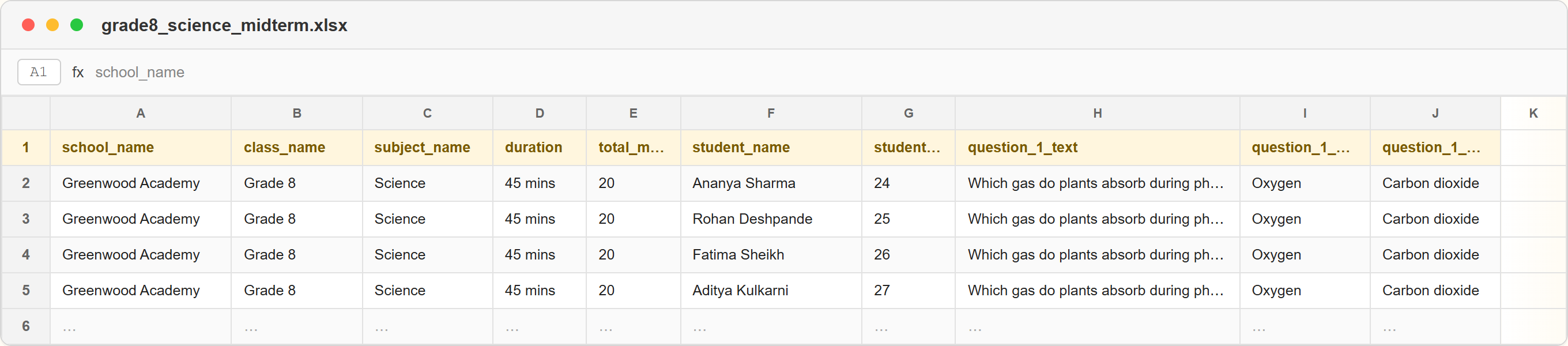
Here's what each column actually controls on the finished paper:
school_name— Your school's name, printed in the header band of every paper.school_logo— Your school's logo image — saved once on your account, then carried across every paper you generate.school_address— Printed as a small subline under the school name.class_name— E.g. “Grade 8” or “10th – Section B” — whatever your register calls the class.subject_name— Free text — any subject your school teaches, not a fixed dropdown.duration— E.g. “45 Minutes” or “2 Hours”, printed in the paper's info bar.total_marks— Printed alongside duration in the same info bar.student_name / student_roll_number— Leave both blank for one shared class paper, or fill one row per student for personalized, individually QR-verified copies.question_1_text … question_N_text— The question itself — one set per question slot the template supports (4, fixed, on most school templates).question_N_option_a / _b / _c / _d— The four answer choices for that question, printed as lettered options under it.
Two practical details worth knowing before you build your own sheet from scratch. First, column matching works by header name, not by position — so as long as the header row uses the exact names above, the columns don't need to be in this exact order. Second, only the first sheet is read as data; PaperBee's own downloadable templates include extra reference sheets alongside it — a field-reference sheet explaining every column, and a QR-position sheet for anyone customizing the layout — without those extra sheets affecting the upload at all. In practice, downloading the template for whichever grade and format you've picked is the fastest way to get the header row exactly right; the field list above is meant as a reference for understanding what's happening, not something to retype from scratch.
No answer-key column, on purpose
Why free-text fields instead of dropdowns
Fields like subject_name and class_name are plain text rather than a fixed list of choices, which is a deliberate trade-off. A dropdown would guarantee tidy, consistent values, but it would also force every school into someone else's naming convention — "Grade 8" versus "8th Standard" versus "VIII", or a subject like "EVS" that doesn't cleanly map to a generic list. Free text means the paper says exactly what your school already calls things, at the cost of needing to type it consistently yourself, which the spreadsheet format makes easy since you're usually copying the same value down a column rather than retyping it.
One row, one paper
The pattern that makes this powerful is simple: every row in the sheet becomes one generated paper. If you leave student_name and student_roll_number blank across the board, you get one shared paper — upload a single row, generate a single PDF, photocopy it for the room. If you fill in a row per student instead, with the exam details repeated identically and only the name and roll number changing, PaperBee generates one individually personalized, QR-sealed paper per student in the same batch. Both are the same upload flow; the only difference is how many rows you give it.
Step by step: from a blank sheet to a finished exam set
Step 1 — Try the live demo, no signup needed
Open the question paper generator, type in a school name, a subject, and a question or two, and watch a print-ready paper build itself on screen. No account, no upload, nothing to install — this is the fastest way to judge whether a template's layout fits how your school's papers usually look.
Step 2 — Create a free account and pick a template
Sign up, then choose a template built for the grade and question count you need. Upload your school's logo once and it's saved — every paper generated afterward carries it automatically, on your school's own letterhead-style header rather than a generic layout.
Step 3 — Fill in your exam details and questions
Download the template's Excel sheet, fill in the exam details once, and add your questions and options in the columns described above. This is the only manual step left, and it's the same work a teacher already does when setting an exam — just typed into cells instead of formatted by hand. If the exam needs personalized copies, this is also where you paste in the class list, repeating the exam details down every row.
Step 4 — Upload and generate
Upload the completed sheet. PaperBee reads every row and produces a finished, formatted PDF for each one — a single shared class paper, or one personalized paper per student, depending on how you filled in the student columns. Every real paper is sealed with its own scannable QR verification code, and the whole batch finishes in roughly the time it takes to make a coffee, regardless of whether it's five rows or fifty.
Step 5 — Download, print, and distribute
Download the full batch as print-ready PDFs, sized correctly for printing or photocopying, and hand them out on exam day.
%22%3E%0A%20%20%20%20%20%20%3Crect%20x%3D%22304%22%20y%3D%2296%22%20width%3D%2270%22%20height%3D%2292%22%20rx%3D%226%22%20fill%3D%22%23FFFCF5%22%20stroke%3D%22%231B1712%22%20stroke-width%3D%224%22%2F%3E%0A%20%20%20%20%20%20%0A%20%20%20%20%20%20%3Crect%20x%3D%22314%22%20y%3D%22106%22%20width%3D%2250%22%20height%3D%228%22%20rx%3D%224%22%20fill%3D%22%23E8850C%22%2F%3E%0A%20%20%20%20%20%20%3Crect%20x%3D%22314%22%20y%3D%22120%22%20width%3D%2246%22%20height%3D%225%22%20rx%3D%222.5%22%20fill%3D%22%231B1712%22%20opacity%3D%220.4%22%2F%3E%0A%20%20%20%20%20%20%3Crect%20x%3D%22316%22%20y%3D%22130%22%20width%3D%2210%22%20height%3D%2210%22%20rx%3D%222%22%20fill%3D%22none%22%20stroke%3D%22%231B1712%22%20stroke-width%3D%221.6%22%2F%3E%0A%20%20%20%20%20%20%3Crect%20x%3D%22339%22%20y%3D%22130%22%20width%3D%2210%22%20height%3D%2210%22%20rx%3D%222%22%20fill%3D%22none%22%20stroke%3D%22%231B1712%22%20stroke-width%3D%221.6%22%2F%3E%0A%20%20%20%20%20%20%3Crect%20x%3D%22314%22%20y%3D%22148%22%20width%3D%2246%22%20height%3D%225%22%20rx%3D%222.5%22%20fill%3D%22%231B1712%22%20opacity%3D%220.4%22%2F%3E%0A%20%20%20%20%20%20%3Crect%20x%3D%22316%22%20y%3D%22158%22%20width%3D%2210%22%20height%3D%2210%22%20rx%3D%222%22%20fill%3D%22none%22%20stroke%3D%22%231B1712%22%20stroke-width%3D%221.6%22%2F%3E%0A%20%20%20%20%20%20%3Crect%20x%3D%22339%22%20y%3D%22158%22%20width%3D%2210%22%20height%3D%2210%22%20rx%3D%222%22%20fill%3D%22none%22%20stroke%3D%22%231B1712%22%20stroke-width%3D%221.6%22%2F%3E%0A%20%20%20%20%0A%20%20%20%20%3C%2Fg%3E%0A%20%20%0A%20%20%0A%20%20%20%20%3Cg%20transform%3D%22rotate(4%20367%20164)%22%3E%0A%20%20%20%20%20%20%3Crect%20x%3D%22332%22%20y%3D%22118%22%20width%3D%2270%22%20height%3D%2292%22%20rx%3D%226%22%20fill%3D%22%23FFFCF5%22%20stroke%3D%22%231B1712%22%20stroke-width%3D%224%22%2F%3E%0A%20%20%20%20%20%20%0A%20%20%20%20%20%20%3Crect%20x%3D%22342%22%20y%3D%22128%22%20width%3D%2250%22%20height%3D%228%22%20rx%3D%224%22%20fill%3D%22%23E8850C%22%2F%3E%0A%20%20%20%20%20%20%3Crect%20x%3D%22342%22%20y%3D%22142%22%20width%3D%2246%22%20height%3D%225%22%20rx%3D%222.5%22%20fill%3D%22%231B1712%22%20opacity%3D%220.4%22%2F%3E%0A%20%20%20%20%20%20%3Crect%20x%3D%22344%22%20y%3D%22152%22%20width%3D%2210%22%20height%3D%2210%22%20rx%3D%222%22%20fill%3D%22none%22%20stroke%3D%22%231B1712%22%20stroke-width%3D%221.6%22%2F%3E%0A%20%20%20%20%20%20%3Crect%20x%3D%22367%22%20y%3D%22152%22%20width%3D%2210%22%20height%3D%2210%22%20rx%3D%222%22%20fill%3D%22none%22%20stroke%3D%22%231B1712%22%20stroke-width%3D%221.6%22%2F%3E%0A%20%20%20%20%20%20%3Crect%20x%3D%22342%22%20y%3D%22170%22%20width%3D%2246%22%20height%3D%225%22%20rx%3D%222.5%22%20fill%3D%22%231B1712%22%20opacity%3D%220.4%22%2F%3E%0A%20%20%20%20%20%20%3Crect%20x%3D%22344%22%20y%3D%22180%22%20width%3D%2210%22%20height%3D%2210%22%20rx%3D%222%22%20fill%3D%22none%22%20stroke%3D%22%231B1712%22%20stroke-width%3D%221.6%22%2F%3E%0A%20%20%20%20%20%20%3Crect%20x%3D%22367%22%20y%3D%22180%22%20width%3D%2210%22%20height%3D%2210%22%20rx%3D%222%22%20fill%3D%22none%22%20stroke%3D%22%231B1712%22%20stroke-width%3D%221.6%22%2F%3E%0A%20%20%20%20%0A%20%20%20%20%3C%2Fg%3E%0A%20%20%0A%20%20%0A%20%20%20%20%3Cg%20transform%3D%22rotate(14%20395%20146)%22%3E%0A%20%20%20%20%20%20%3Crect%20x%3D%22360%22%20y%3D%22100%22%20width%3D%2270%22%20height%3D%2292%22%20rx%3D%226%22%20fill%3D%22%23FFFCF5%22%20stroke%3D%22%231B1712%22%20stroke-width%3D%224%22%2F%3E%0A%20%20%20%20%20%20%0A%20%20%20%20%20%20%3Crect%20x%3D%22370%22%20y%3D%22110%22%20width%3D%2250%22%20height%3D%228%22%20rx%3D%224%22%20fill%3D%22%23E8850C%22%2F%3E%0A%20%20%20%20%20%20%3Crect%20x%3D%22370%22%20y%3D%22124%22%20width%3D%2246%22%20height%3D%225%22%20rx%3D%222.5%22%20fill%3D%22%231B1712%22%20opacity%3D%220.4%22%2F%3E%0A%20%20%20%20%20%20%3Crect%20x%3D%22372%22%20y%3D%22134%22%20width%3D%2210%22%20height%3D%2210%22%20rx%3D%222%22%20fill%3D%22none%22%20stroke%3D%22%231B1712%22%20stroke-width%3D%221.6%22%2F%3E%0A%20%20%20%20%20%20%3Crect%20x%3D%22395%22%20y%3D%22134%22%20width%3D%2210%22%20height%3D%2210%22%20rx%3D%222%22%20fill%3D%22none%22%20stroke%3D%22%231B1712%22%20stroke-width%3D%221.6%22%2F%3E%0A%20%20%20%20%20%20%3Crect%20x%3D%22370%22%20y%3D%22152%22%20width%3D%2246%22%20height%3D%225%22%20rx%3D%222.5%22%20fill%3D%22%231B1712%22%20opacity%3D%220.4%22%2F%3E%0A%20%20%20%20%20%20%3Crect%20x%3D%22372%22%20y%3D%22162%22%20width%3D%2210%22%20height%3D%2210%22%20rx%3D%222%22%20fill%3D%22none%22%20stroke%3D%22%231B1712%22%20stroke-width%3D%221.6%22%2F%3E%0A%20%20%20%20%20%20%3Crect%20x%3D%22395%22%20y%3D%22162%22%20width%3D%2210%22%20height%3D%2210%22%20rx%3D%222%22%20fill%3D%22none%22%20stroke%3D%22%231B1712%22%20stroke-width%3D%221.6%22%2F%3E%0A%20%20%20%20%0A%20%20%20%20%3C%2Fg%3E%0A%20%20%0A%20%20%3Ctext%20x%3D%22368%22%20y%3D%22222%22%20text-anchor%3D%22middle%22%20font-family%3D%22Arial%22%20font-size%3D%2211%22%20fill%3D%22%234A4033%22%20font-weight%3D%22700%22%3EONE%20PAPER%20PER%20ROW%3C%2Ftext%3E%0A%3C%2Fsvg%3E)
Types of question papers you can create
“Question paper” covers a lot of different documents in practice, from a five-minute Friday recap to a full board-pattern annual exam. Here's a working list of what schools and institutes actually generate with PaperBee:
- Unit Test / Class Test Paper. A short, single-subject paper for a quick in-class assessment — usually the 4-question format, done and marked within a single period. It's the paper type most schools end up generating most often, simply because it happens most often.
- Half-Yearly / Mid-Term Examination Paper. A longer, more formal paper covering a term's worth of material, typically with an instructions block, invigilator signature line, and a higher question count. Worth picking a template with more visual structure than a routine unit test needs.
- Annual / Final Board-Pattern Examination Paper. The end-of-year exam, formatted to match the structure students will eventually see in an actual board exam — the highest-stakes paper a school generates all year. Consistency with previous years' formatting matters more here than almost anywhere else.
- CBSE / ICSE / State-Board Style Paper. Formatted to resemble the board pattern your school follows, so students get used to the exact look of the paper they'll eventually sit for real. Familiarity with the format is itself a small form of exam preparation.
- Subject-Wise Paper. One paper per subject — Math, Science, English, Social Studies, Computer Science — generated separately even when they're being handed out the same exam week. Keeping subjects as separate uploads also keeps question banks easier to reuse later.
- Grade-Specific Paper (5th–12th). Templates tuned per grade band, from a single-page foundational test in 5th standard to a longer, exam-pattern paper for 10th and 12th. Picking the right grade template up front saves reformatting a paper that turns out too short or too long.
- Shared Class Paper. One paper, generated once and photocopied for the whole room — the right choice when individual traceability doesn't matter, just speed. This is the fastest possible path from spreadsheet to exam-ready stack of paper.
- Personalized Per-Student Paper. A paper for every student individually, pre-filled with their name and roll number and sealed with its own unique QR code — the right choice for anything that needs to be traceable back to one student. Costs nothing extra beyond adding rows to the same upload.
- Practice / Mock Test Paper. A lower-stakes paper generated purely for exam practice, often reusing the same question bank in a different order to keep it feeling fresh. Cheap enough to generate that students can get several attempts before the real thing.
- Weekly Quiz / Recap Paper. A lightweight, few-question paper to recap the week's material — cheap enough to generate that a weekly cadence stops feeling like a burden. Pairs naturally with a small running question bank built up one week at a time.
- Remedial / Retest Paper. A second-attempt paper for students who need to retake an assessment, generated separately so it can carry different questions from the original. Personalizing these by roll number also keeps retest records cleanly separate from the first attempt.
- Coaching Institute Entrance Test Paper. Used by coaching institutes to screen or place incoming batches — same MCQ format, just issued outside a regular school term. QR-verified copies matter here too, since entrance test disputes are common enough to plan for.
- Scholarship / Talent-Search Test Paper. A higher-stakes standalone test paper for scholarship or talent-search exams, where a QR-verified, individually traceable copy per candidate matters even more than usual. Worth treating with the same care as a board-pattern annual exam.

Most schools end up using several of these at once rather than picking just one — a weekly quiz for formative feedback, a monthly unit test for grading, and half-yearly and annual papers for the two big checkpoints in the calendar. None of them require a different tool or a different process; they're the same Excel-upload flow with a different template and a different question bank behind it, which is exactly why it's worth setting up a reusable sheet structure once rather than starting from a blank file every time a new occasion comes up.
Choosing a template: real examples
Every template turns the same underlying spreadsheet into a different look on paper — a stricter, exam-hall black-and-white layout for one school, a warmer, branded design for another. It's worth picking one that matches how your school's papers are expected to look before generating a full batch. Here are four real, currently available designs:
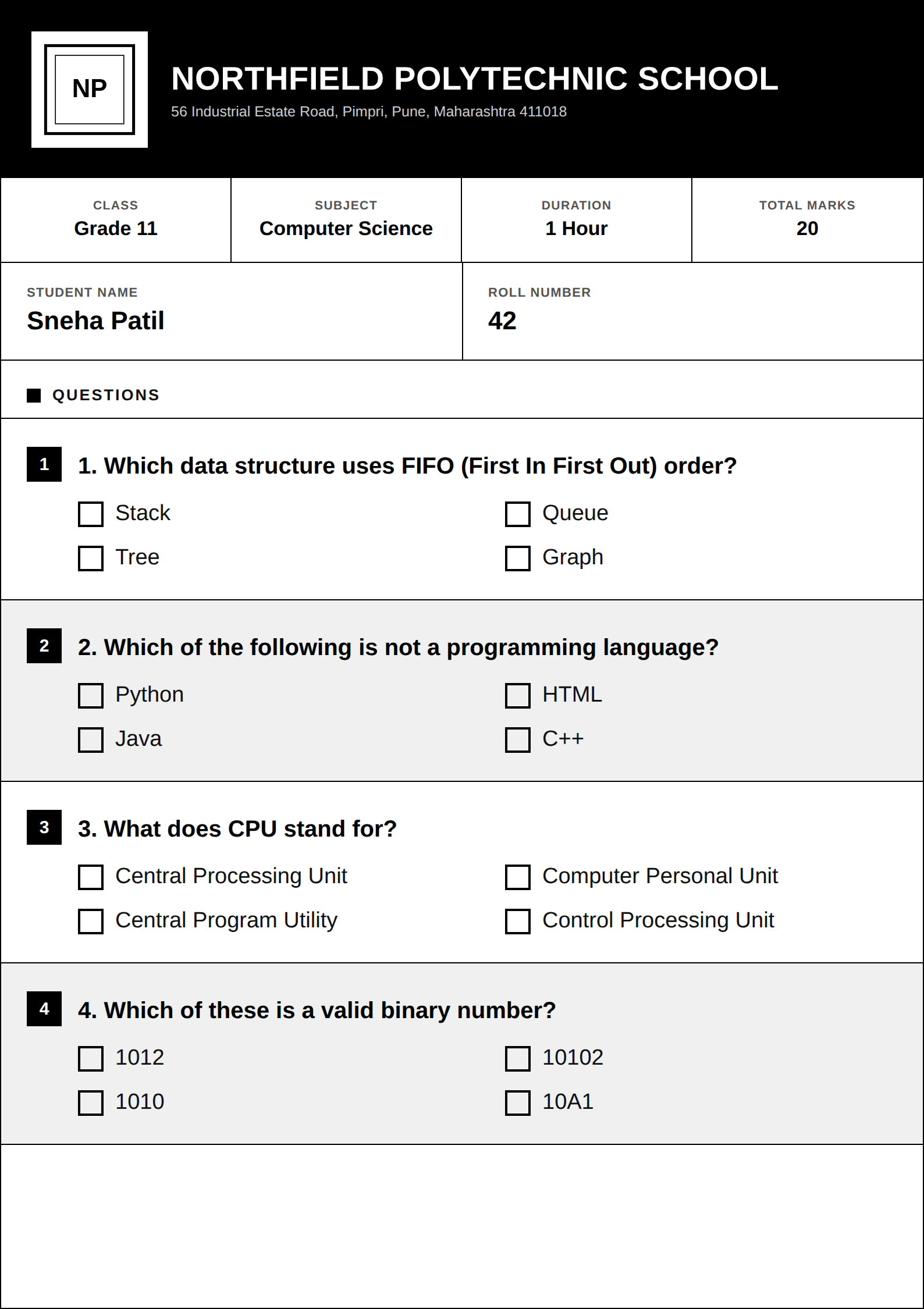
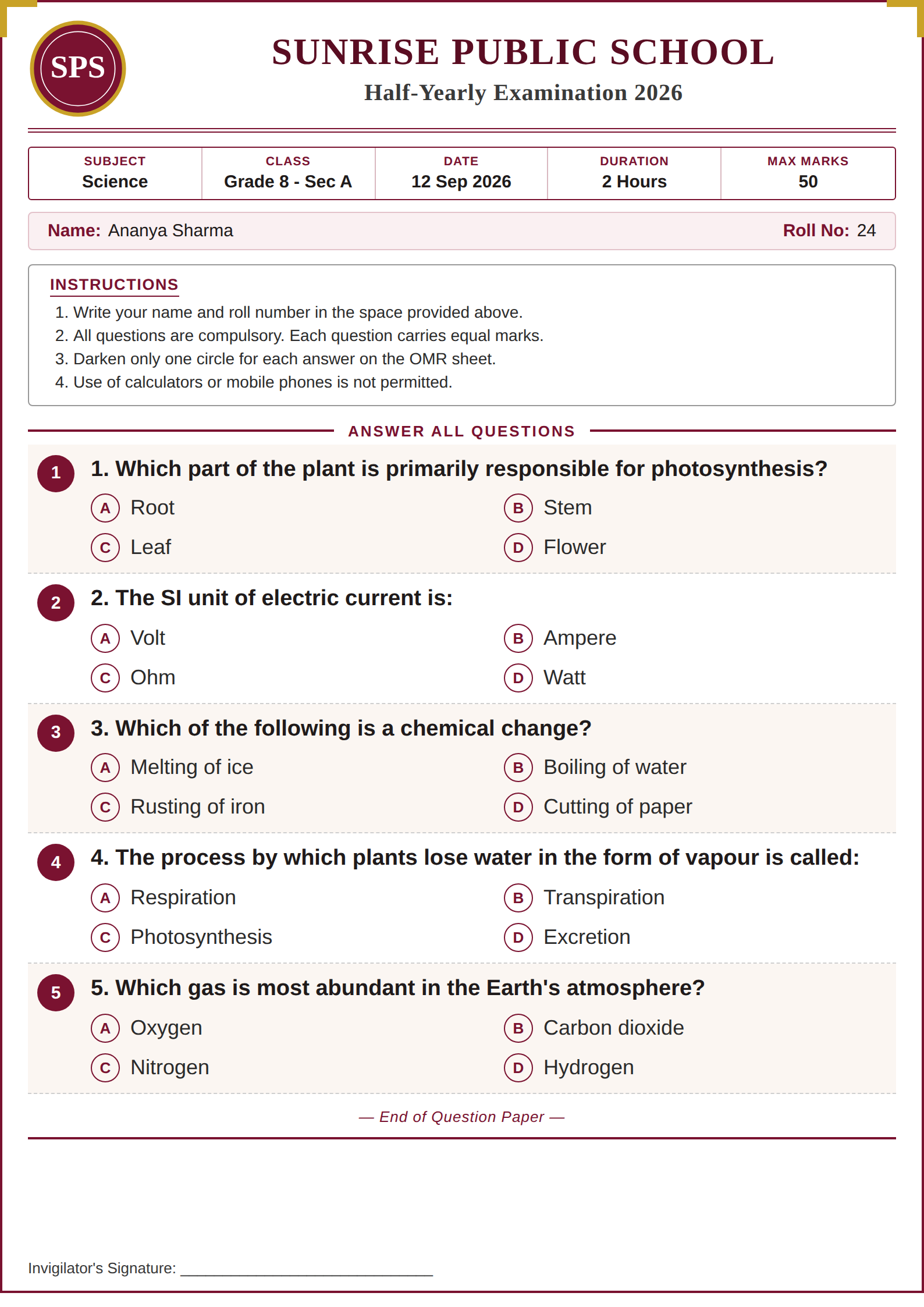
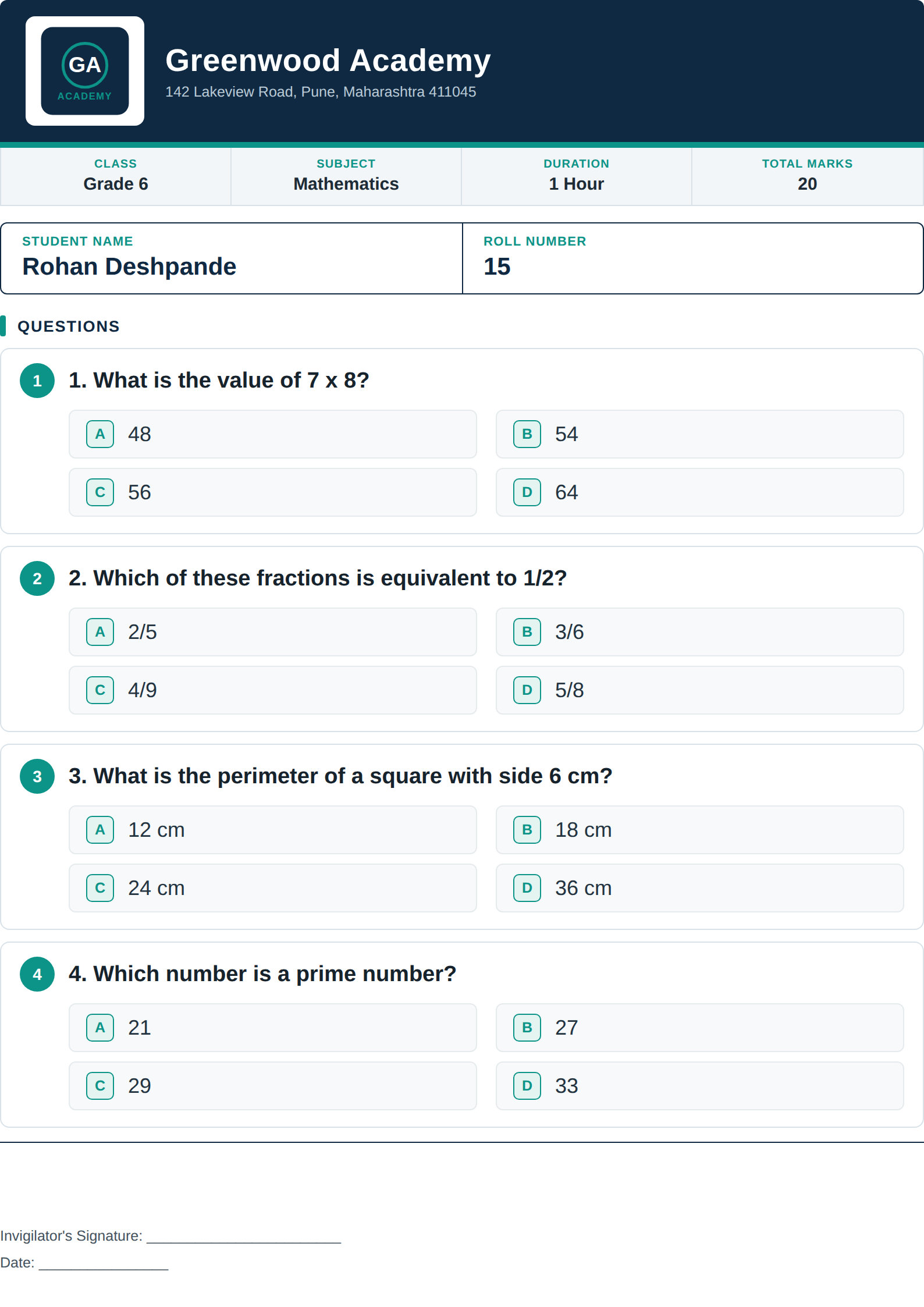
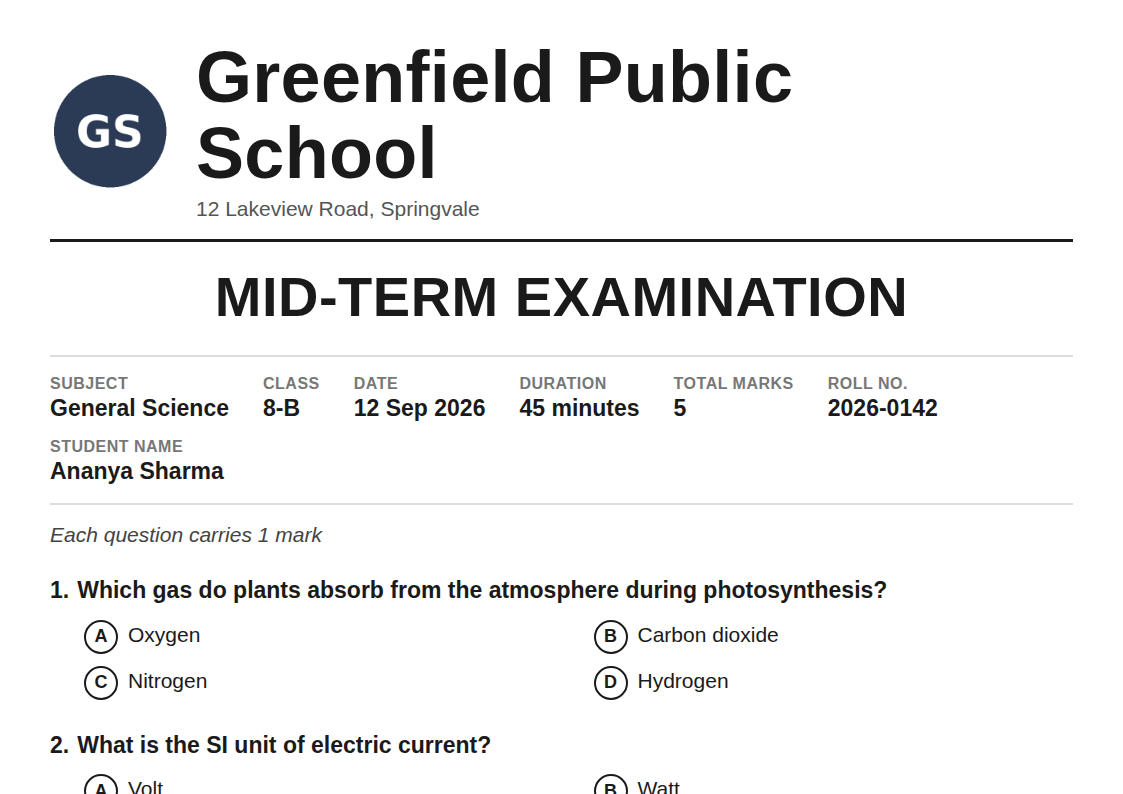
Beyond the colour palette, the real differences worth checking before you commit are whether the template includes an instructions block (useful for formal exams, unnecessary clutter for a quick recap quiz), whether options are laid out as lettered circles or checkboxes, and whether it reserves a visible line for an invigilator's signature — a small detail that matters far more for a half-yearly exam than a Friday quiz.
As with certificates, it's worth settling on one or two templates per occasion type and sticking with them across a school year rather than switching for variety's sake. A half-yearly exam that looks visually consistent with the one before it reads as a school that runs things carefully; a different design every term reads as improvised, even when the questions inside are exactly as well written either way.
How many questions should a paper actually have?
Most school MCQ templates are built around a fixed 4-question layout, which covers more ground than it might sound like once you account for how it's actually used. A single-page, 4-question paper is genuinely enough for a quick unit test in the middle grades, and any question slot you leave blank in the sheet is simply left off the printed paper — so a 2 or 3-question quick check works fine on the exact same template.
For anything longer — a half-yearly, an annual exam, or a board-pattern paper for 9th, 10th, or 12th standard — the practical answer is to run several shorter papers rather than force everything onto one oversized template. A school covering four topics in an annual exam, for instance, is often better served generating four separate 4-question sections as distinct papers (or distinct pages within the same upload) than cramming sixteen questions into a single dense sheet. It keeps each page readable and keeps the underlying spreadsheet easy to review before generating.
One shared paper vs. one personalized paper per student
This is the single most important decision the upload sheet controls, and it costs nothing extra either way — it's purely a matter of how many rows you give it. It's also a decision worth making deliberately rather than defaulting to whichever option was used last time, since the two produce genuinely different documents suited to genuinely different situations.
%22%3E%0A%20%20%20%20%20%20%3Crect%20x%3D%22148%22%20y%3D%2256%22%20width%3D%2284%22%20height%3D%2296%22%20rx%3D%226%22%20fill%3D%22%23FFFCF5%22%20stroke%3D%22%231B1712%22%20stroke-width%3D%224%22%2F%3E%0A%20%20%20%20%20%20%0A%20%20%20%20%20%20%3Crect%20x%3D%22158%22%20y%3D%2266%22%20width%3D%2264%22%20height%3D%228%22%20rx%3D%224%22%20fill%3D%22%23E8850C%22%2F%3E%0A%20%20%20%20%20%20%3Crect%20x%3D%22158%22%20y%3D%2280%22%20width%3D%2260%22%20height%3D%225%22%20rx%3D%222.5%22%20fill%3D%22%231B1712%22%20opacity%3D%220.4%22%2F%3E%0A%20%20%20%20%20%20%3Crect%20x%3D%22160%22%20y%3D%2290%22%20width%3D%2210%22%20height%3D%2210%22%20rx%3D%222%22%20fill%3D%22none%22%20stroke%3D%22%231B1712%22%20stroke-width%3D%221.6%22%2F%3E%0A%20%20%20%20%20%20%3Crect%20x%3D%22190%22%20y%3D%2290%22%20width%3D%2210%22%20height%3D%2210%22%20rx%3D%222%22%20fill%3D%22none%22%20stroke%3D%22%231B1712%22%20stroke-width%3D%221.6%22%2F%3E%0A%20%20%20%20%20%20%3Crect%20x%3D%22158%22%20y%3D%22108%22%20width%3D%2260%22%20height%3D%225%22%20rx%3D%222.5%22%20fill%3D%22%231B1712%22%20opacity%3D%220.4%22%2F%3E%0A%20%20%20%20%20%20%3Crect%20x%3D%22160%22%20y%3D%22118%22%20width%3D%2210%22%20height%3D%2210%22%20rx%3D%222%22%20fill%3D%22none%22%20stroke%3D%22%231B1712%22%20stroke-width%3D%221.6%22%2F%3E%0A%20%20%20%20%20%20%3Crect%20x%3D%22190%22%20y%3D%22118%22%20width%3D%2210%22%20height%3D%2210%22%20rx%3D%222%22%20fill%3D%22none%22%20stroke%3D%22%231B1712%22%20stroke-width%3D%221.6%22%2F%3E%0A%20%20%20%20%0A%20%20%20%20%3C%2Fg%3E%0A%20%20%0A%20%20%20%20%0A%20%20%20%20%3Cg%3E%0A%20%20%20%20%20%20%3Cpath%20d%3D%22M59%2C243%20Q59%2C203%2090%2C203%20Q121%2C203%20121%2C243%20Z%22%20fill%3D%22%237FB2A8%22%20stroke%3D%22%231B1712%22%20stroke-width%3D%224.5%22%2F%3E%0A%20%20%20%20%20%20%0A%20%20%20%20%20%20%3Ccircle%20cx%3D%2290%22%20cy%3D%22190%22%20r%3D%2219%22%20fill%3D%22%23FFFCF5%22%20stroke%3D%22%231B1712%22%20stroke-width%3D%224.5%22%2F%3E%0A%20%20%20%20%20%20%3Cpath%20d%3D%22M71%2C188%20Q73%2C161%2090%2C163%20Q107%2C161%20109%2C188%22%20fill%3D%22%231B1712%22%20stroke%3D%22%231B1712%22%20stroke-width%3D%223%22%2F%3E%0A%20%20%20%20%20%20%3Ccircle%20cx%3D%2283.35%22%20cy%3D%22190%22%20r%3D%223%22%20fill%3D%22%231B1712%22%2F%3E%0A%20%20%20%20%20%20%3Ccircle%20cx%3D%2296.65%22%20cy%3D%22190%22%20r%3D%223%22%20fill%3D%22%231B1712%22%2F%3E%0A%20%20%20%20%20%20%3Cpath%20d%3D%22M83.92%2C197.6%20Q90%2C201.78%2096.08%2C197.6%22%20stroke%3D%22%231B1712%22%20stroke-width%3D%222.5%22%20fill%3D%22none%22%20stroke-linecap%3D%22round%22%2F%3E%0A%20%20%20%20%3C%2Fg%3E%0A%20%20%0A%20%20%20%20%0A%20%20%20%20%3Cg%3E%0A%20%20%20%20%20%20%3Cpath%20d%3D%22M109%2C248%20Q109%2C208%20140%2C208%20Q171%2C208%20171%2C248%20Z%22%20fill%3D%22%23FFC229%22%20stroke%3D%22%231B1712%22%20stroke-width%3D%224.5%22%2F%3E%0A%20%20%20%20%20%20%0A%20%20%20%20%20%20%3Ccircle%20cx%3D%22140%22%20cy%3D%22195%22%20r%3D%2219%22%20fill%3D%22%23FFFCF5%22%20stroke%3D%22%231B1712%22%20stroke-width%3D%224.5%22%2F%3E%0A%20%20%20%20%20%20%3Ccircle%20cx%3D%22115%22%20cy%3D%22193%22%20r%3D%229%22%20fill%3D%22%231B1712%22%20stroke%3D%22%231B1712%22%20stroke-width%3D%223%22%2F%3E%3Ccircle%20cx%3D%22165%22%20cy%3D%22193%22%20r%3D%229%22%20fill%3D%22%231B1712%22%20stroke%3D%22%231B1712%22%20stroke-width%3D%223%22%2F%3E%0A%20%20%20%20%20%20%3Ccircle%20cx%3D%22133.35%22%20cy%3D%22195%22%20r%3D%223%22%20fill%3D%22%231B1712%22%2F%3E%0A%20%20%20%20%20%20%3Ccircle%20cx%3D%22146.65%22%20cy%3D%22195%22%20r%3D%223%22%20fill%3D%22%231B1712%22%2F%3E%0A%20%20%20%20%20%20%3Cpath%20d%3D%22M133.92%2C202.6%20Q140%2C206.78%20146.08%2C202.6%22%20stroke%3D%22%231B1712%22%20stroke-width%3D%222.5%22%20fill%3D%22none%22%20stroke-linecap%3D%22round%22%2F%3E%0A%20%20%20%20%3C%2Fg%3E%0A%20%20%0A%20%20%20%20%0A%20%20%20%20%3Cg%3E%0A%20%20%20%20%20%20%3Cpath%20d%3D%22M159%2C243%20Q159%2C203%20190%2C203%20Q221%2C203%20221%2C243%20Z%22%20fill%3D%22%23C98BD9%22%20stroke%3D%22%231B1712%22%20stroke-width%3D%224.5%22%2F%3E%0A%20%20%20%20%20%20%0A%20%20%20%20%20%20%3Ccircle%20cx%3D%22190%22%20cy%3D%22190%22%20r%3D%2219%22%20fill%3D%22%23FFFCF5%22%20stroke%3D%22%231B1712%22%20stroke-width%3D%224.5%22%2F%3E%0A%20%20%20%20%20%20%3Cpath%20d%3D%22M171%2C188%20Q173%2C161%20190%2C163%20Q207%2C161%20209%2C188%22%20fill%3D%22%231B1712%22%20stroke%3D%22%231B1712%22%20stroke-width%3D%223%22%2F%3E%0A%20%20%20%20%20%20%3Ccircle%20cx%3D%22183.35%22%20cy%3D%22190%22%20r%3D%223%22%20fill%3D%22%231B1712%22%2F%3E%0A%20%20%20%20%20%20%3Ccircle%20cx%3D%22196.65%22%20cy%3D%22190%22%20r%3D%223%22%20fill%3D%22%231B1712%22%2F%3E%0A%20%20%20%20%20%20%3Cpath%20d%3D%22M183.92%2C197.6%20Q190%2C201.78%20196.08%2C197.6%22%20stroke%3D%22%231B1712%22%20stroke-width%3D%222.5%22%20fill%3D%22none%22%20stroke-linecap%3D%22round%22%2F%3E%0A%20%20%20%20%3C%2Fg%3E%0A%20%20%0A%20%20%20%20%3Ctext%20x%3D%22150%22%20y%3D%22266%22%20text-anchor%3D%22middle%22%20font-family%3D%22Arial%22%20font-size%3D%2211%22%20fill%3D%22%234A4033%22%20font-weight%3D%22700%22%3EONE%20SHARED%20PAPER%3C%2Ftext%3E%0A%20%20%3C%2Fg%3E%0A%20%20%3Cg%3E%0A%20%20%20%20%0A%20%20%20%20%3Cg%20transform%3D%22rotate(-10%20299%20118)%22%3E%0A%20%20%20%20%20%20%3Crect%20x%3D%22268%22%20y%3D%2276%22%20width%3D%2262%22%20height%3D%2284%22%20rx%3D%226%22%20fill%3D%22%23FFFCF5%22%20stroke%3D%22%231B1712%22%20stroke-width%3D%224%22%2F%3E%0A%20%20%20%20%20%20%0A%20%20%20%20%20%20%3Crect%20x%3D%22278%22%20y%3D%2286%22%20width%3D%2242%22%20height%3D%228%22%20rx%3D%224%22%20fill%3D%22%23E8850C%22%2F%3E%0A%20%20%20%20%20%20%3Crect%20x%3D%22278%22%20y%3D%22100%22%20width%3D%2238%22%20height%3D%225%22%20rx%3D%222.5%22%20fill%3D%22%231B1712%22%20opacity%3D%220.4%22%2F%3E%0A%20%20%20%20%20%20%3Crect%20x%3D%22280%22%20y%3D%22110%22%20width%3D%2210%22%20height%3D%2210%22%20rx%3D%222%22%20fill%3D%22none%22%20stroke%3D%22%231B1712%22%20stroke-width%3D%221.6%22%2F%3E%0A%20%20%20%20%20%20%3Crect%20x%3D%22299%22%20y%3D%22110%22%20width%3D%2210%22%20height%3D%2210%22%20rx%3D%222%22%20fill%3D%22none%22%20stroke%3D%22%231B1712%22%20stroke-width%3D%221.6%22%2F%3E%0A%20%20%20%20%20%20%3Crect%20x%3D%22278%22%20y%3D%22128%22%20width%3D%2238%22%20height%3D%225%22%20rx%3D%222.5%22%20fill%3D%22%231B1712%22%20opacity%3D%220.4%22%2F%3E%0A%20%20%20%20%20%20%3Crect%20x%3D%22280%22%20y%3D%22138%22%20width%3D%2210%22%20height%3D%2210%22%20rx%3D%222%22%20fill%3D%22none%22%20stroke%3D%22%231B1712%22%20stroke-width%3D%221.6%22%2F%3E%0A%20%20%20%20%20%20%3Crect%20x%3D%22299%22%20y%3D%22138%22%20width%3D%2210%22%20height%3D%2210%22%20rx%3D%222%22%20fill%3D%22none%22%20stroke%3D%22%231B1712%22%20stroke-width%3D%221.6%22%2F%3E%0A%20%20%20%20%0A%20%20%20%20%3C%2Fg%3E%0A%20%20%0A%20%20%20%20%0A%20%20%20%20%3Cg%20transform%3D%22rotate(4%20353%20118)%22%3E%0A%20%20%20%20%20%20%3Crect%20x%3D%22322%22%20y%3D%2276%22%20width%3D%2262%22%20height%3D%2284%22%20rx%3D%226%22%20fill%3D%22%23FFFCF5%22%20stroke%3D%22%231B1712%22%20stroke-width%3D%224%22%2F%3E%0A%20%20%20%20%20%20%0A%20%20%20%20%20%20%3Crect%20x%3D%22332%22%20y%3D%2286%22%20width%3D%2242%22%20height%3D%228%22%20rx%3D%224%22%20fill%3D%22%23E8850C%22%2F%3E%0A%20%20%20%20%20%20%3Crect%20x%3D%22332%22%20y%3D%22100%22%20width%3D%2238%22%20height%3D%225%22%20rx%3D%222.5%22%20fill%3D%22%231B1712%22%20opacity%3D%220.4%22%2F%3E%0A%20%20%20%20%20%20%3Crect%20x%3D%22334%22%20y%3D%22110%22%20width%3D%2210%22%20height%3D%2210%22%20rx%3D%222%22%20fill%3D%22none%22%20stroke%3D%22%231B1712%22%20stroke-width%3D%221.6%22%2F%3E%0A%20%20%20%20%20%20%3Crect%20x%3D%22353%22%20y%3D%22110%22%20width%3D%2210%22%20height%3D%2210%22%20rx%3D%222%22%20fill%3D%22none%22%20stroke%3D%22%231B1712%22%20stroke-width%3D%221.6%22%2F%3E%0A%20%20%20%20%20%20%3Crect%20x%3D%22332%22%20y%3D%22128%22%20width%3D%2238%22%20height%3D%225%22%20rx%3D%222.5%22%20fill%3D%22%231B1712%22%20opacity%3D%220.4%22%2F%3E%0A%20%20%20%20%20%20%3Crect%20x%3D%22334%22%20y%3D%22138%22%20width%3D%2210%22%20height%3D%2210%22%20rx%3D%222%22%20fill%3D%22none%22%20stroke%3D%22%231B1712%22%20stroke-width%3D%221.6%22%2F%3E%0A%20%20%20%20%20%20%3Crect%20x%3D%22353%22%20y%3D%22138%22%20width%3D%2210%22%20height%3D%2210%22%20rx%3D%222%22%20fill%3D%22none%22%20stroke%3D%22%231B1712%22%20stroke-width%3D%221.6%22%2F%3E%0A%20%20%20%20%0A%20%20%20%20%3C%2Fg%3E%0A%20%20%0A%20%20%20%20%0A%20%20%20%20%3Cg%20transform%3D%22rotate(14%20407%20118)%22%3E%0A%20%20%20%20%20%20%3Crect%20x%3D%22376%22%20y%3D%2276%22%20width%3D%2262%22%20height%3D%2284%22%20rx%3D%226%22%20fill%3D%22%23FFFCF5%22%20stroke%3D%22%231B1712%22%20stroke-width%3D%224%22%2F%3E%0A%20%20%20%20%20%20%0A%20%20%20%20%20%20%3Crect%20x%3D%22386%22%20y%3D%2286%22%20width%3D%2242%22%20height%3D%228%22%20rx%3D%224%22%20fill%3D%22%23E8850C%22%2F%3E%0A%20%20%20%20%20%20%3Crect%20x%3D%22386%22%20y%3D%22100%22%20width%3D%2238%22%20height%3D%225%22%20rx%3D%222.5%22%20fill%3D%22%231B1712%22%20opacity%3D%220.4%22%2F%3E%0A%20%20%20%20%20%20%3Crect%20x%3D%22388%22%20y%3D%22110%22%20width%3D%2210%22%20height%3D%2210%22%20rx%3D%222%22%20fill%3D%22none%22%20stroke%3D%22%231B1712%22%20stroke-width%3D%221.6%22%2F%3E%0A%20%20%20%20%20%20%3Crect%20x%3D%22407%22%20y%3D%22110%22%20width%3D%2210%22%20height%3D%2210%22%20rx%3D%222%22%20fill%3D%22none%22%20stroke%3D%22%231B1712%22%20stroke-width%3D%221.6%22%2F%3E%0A%20%20%20%20%20%20%3Crect%20x%3D%22386%22%20y%3D%22128%22%20width%3D%2238%22%20height%3D%225%22%20rx%3D%222.5%22%20fill%3D%22%231B1712%22%20opacity%3D%220.4%22%2F%3E%0A%20%20%20%20%20%20%3Crect%20x%3D%22388%22%20y%3D%22138%22%20width%3D%2210%22%20height%3D%2210%22%20rx%3D%222%22%20fill%3D%22none%22%20stroke%3D%22%231B1712%22%20stroke-width%3D%221.6%22%2F%3E%0A%20%20%20%20%20%20%3Crect%20x%3D%22407%22%20y%3D%22138%22%20width%3D%2210%22%20height%3D%2210%22%20rx%3D%222%22%20fill%3D%22none%22%20stroke%3D%22%231B1712%22%20stroke-width%3D%221.6%22%2F%3E%0A%20%20%20%20%0A%20%20%20%20%3C%2Fg%3E%0A%20%20%0A%20%20%20%20%3Ccircle%20cx%3D%22299%22%20cy%3D%22192%22%20r%3D%2220%22%20fill%3D%22%23FFE29B%22%20stroke%3D%22%231B1712%22%20stroke-width%3D%223%22%2F%3E%0A%20%20%20%20%3Ctext%20x%3D%22299%22%20y%3D%22197%22%20text-anchor%3D%22middle%22%20font-family%3D%22Arial%22%20font-size%3D%2212%22%20fill%3D%22%231B1712%22%20font-weight%3D%22700%22%3E24%3C%2Ftext%3E%0A%20%20%20%20%3Ccircle%20cx%3D%22353%22%20cy%3D%22192%22%20r%3D%2220%22%20fill%3D%22%23FFE29B%22%20stroke%3D%22%231B1712%22%20stroke-width%3D%223%22%2F%3E%0A%20%20%20%20%3Ctext%20x%3D%22353%22%20y%3D%22197%22%20text-anchor%3D%22middle%22%20font-family%3D%22Arial%22%20font-size%3D%2212%22%20fill%3D%22%231B1712%22%20font-weight%3D%22700%22%3E25%3C%2Ftext%3E%0A%20%20%20%20%3Ccircle%20cx%3D%22407%22%20cy%3D%22192%22%20r%3D%2220%22%20fill%3D%22%23FFE29B%22%20stroke%3D%22%231B1712%22%20stroke-width%3D%223%22%2F%3E%0A%20%20%20%20%3Ctext%20x%3D%22407%22%20y%3D%22197%22%20text-anchor%3D%22middle%22%20font-family%3D%22Arial%22%20font-size%3D%2212%22%20fill%3D%22%231B1712%22%20font-weight%3D%22700%22%3E26%3C%2Ftext%3E%0A%20%20%20%20%3Ctext%20x%3D%22340%22%20y%3D%22230%22%20text-anchor%3D%22middle%22%20font-family%3D%22Arial%22%20font-size%3D%2211%22%20fill%3D%22%234A4033%22%20font-weight%3D%22700%22%3EONE%20PER%20ROLL%20NUMBER%3C%2Ftext%3E%0A%20%20%3C%2Fg%3E%0A%3C%2Fsvg%3E)
- One shared paper. Leave the student columns blank, upload a single row, and generate one PDF — photocopy it for the whole room. Right for routine tests where individual traceability isn't the point, just getting a clean paper into every hand fast.
- One personalized paper per student. Fill in a row per student with their name and roll number, keeping the exam details identical across rows. PaperBee generates a full set in one pass, each pre-filled with that student's details and sealed with its own unique QR code — right for anything that needs to be traced back to exactly one student afterward.
Why QR verification matters for exam papers specifically
Question paper leaks and tampering are a genuinely recurring problem for schools and institutes — a paper photographed and circulated before the exam, or a copy altered after the fact, isn't a hypothetical concern for a lot of administrators. A unique, scannable QR code sealed onto every real paper PaperBee generates gives a school a fast way to check a specific paper is genuine, matches what was actually issued, and hasn't been swapped for a different version.
It matters most with personalized, per-student papers — a QR code tied to a specific roll number means a disputed or found paper can be traced back to exactly who it belonged to in seconds, rather than becoming a "whose paper is this" conversation in the staff room. Even for a single shared paper photocopied for the room, the QR on the master copy is a quick way to confirm it's the version that was actually approved for that exam, not an earlier draft.
Consider the ordinary version of this problem, not just the dramatic one: a paper gets revised the night before an exam to fix a typo in question three, but one photocopied stack from an earlier draft is still sitting in a staff cupboard. Without anything distinguishing the versions, that old stack could easily get handed out by mistake. A QR code that scans back to a specific, timestamped generation makes that mix-up catchable in seconds rather than discovered halfway through the exam.
%22%3E%0A%20%20%20%20%3Crect%20width%3D%2270%22%20height%3D%2270%22%20rx%3D%226%22%20fill%3D%22%23FFFCF5%22%20stroke%3D%22%231B1712%22%20stroke-width%3D%223%22%2F%3E%0A%20%20%20%20%3Crect%20x%3D%228%22%20y%3D%228%22%20width%3D%2216%22%20height%3D%2216%22%20fill%3D%22%231B1712%22%2F%3E%0A%20%20%20%20%3Crect%20x%3D%2246%22%20y%3D%228%22%20width%3D%2216%22%20height%3D%2216%22%20fill%3D%22%231B1712%22%2F%3E%0A%20%20%20%20%3Crect%20x%3D%228%22%20y%3D%2246%22%20width%3D%2216%22%20height%3D%2216%22%20fill%3D%22%231B1712%22%2F%3E%0A%20%20%20%20%3Crect%20x%3D%2230%22%20y%3D%2210%22%20width%3D%228%22%20height%3D%228%22%20fill%3D%22%231B1712%22%2F%3E%0A%20%20%20%20%3Crect%20x%3D%2246%22%20y%3D%2230%22%20width%3D%228%22%20height%3D%228%22%20fill%3D%22%23E8850C%22%2F%3E%0A%20%20%20%20%3Crect%20x%3D%2230%22%20y%3D%2246%22%20width%3D%228%22%20height%3D%228%22%20fill%3D%22%231B1712%22%2F%3E%0A%20%20%3C%2Fg%3E%0A%20%20%3Cg%20transform%3D%22translate(120%2C205)%22%3E%0A%20%20%20%20%3Crect%20x%3D%22-14%22%20y%3D%220%22%20width%3D%2228%22%20height%3D%2222%22%20rx%3D%224%22%20fill%3D%22%23E8850C%22%20stroke%3D%22%231B1712%22%20stroke-width%3D%223%22%2F%3E%0A%20%20%20%20%3Cpath%20d%3D%22M-8%2C0%20L-8%2C-10%20Q0%2C-20%208%2C-10%20L8%2C0%22%20fill%3D%22none%22%20stroke%3D%22%231B1712%22%20stroke-width%3D%223%22%2F%3E%0A%20%20%3C%2Fg%3E%0A%20%20%3Cpath%20d%3D%22M90%2C53%20L91.96%2C58.04%20L97%2C60%20L91.96%2C61.96%20L90%2C67%20L88.04%2C61.96%20L83%2C60%20L88.04%2C58.04%20Z%22%20fill%3D%22%23FFC229%22%20stroke%3D%22%231B1712%22%20stroke-width%3D%222%22%2F%3E%0A%3C%2Fsvg%3E)
A note for CBSE, ICSE, and state-board schools
Indian schools generate an unusually large volume of question papers compared to a single-board system, simply because the exam calendar is so dense. Unit tests happen roughly monthly, half-yearlies sit around September–October, and the final annual exams cluster into February–March — on top of whatever periodic assessments a state board or individual school layers in between. Building a rough exam calendar at the start of the academic year, the same way it's worth doing for certificates, makes each paper feel planned for rather than assembled the night before.
Board pattern matters too. CBSE, ICSE, and state-board papers each have slightly different conventions around instructions blocks, marks-per-question notation, and how sections are separated — matching your school's actual board pattern, not just picking whichever template looks nicest, is worth the extra minute of comparison, especially for 10th and 12th standard where students genuinely benefit from familiarity with the exact format they'll eventually sit for real.
Beyond schools: coaching institutes and college departments
Schools are the most common user of a question paper generator, but they're not the only one. Coaching institutes running weekly practice tests across large batches have arguably even more to gain from bulk generation than a single school classroom does — a batch of 200 students sitting a weekly mock test is exactly the scale where manually typing papers becomes unworkable, and where QR-verified, individually traceable copies matter most, since coaching institutes routinely deal with disputes over marks and paper authenticity.
College departments use the same workflow for a slightly different reason: a single faculty member often handles question papers for several sections of the same course, and reusing a maintained question bank across semesters — rather than rewriting from scratch each time — is exactly the kind of repetitive task the Excel-upload flow was built to remove. The underlying mechanics don't change between a 6th-grade unit test and a college department's semester exam; only the question bank and the template's visual formality do.
Writing good MCQ questions (the part PaperBee doesn't do for you)
PaperBee handles layout, numbering, and formatting — the actual quality of the questions is still on the person filling in the spreadsheet. Good MCQ writing is its own small skill, and it's worth a few minutes of attention since a poorly written question can undermine an otherwise well-formatted paper. A few things worth keeping in mind while building the question bank:
- Keep all four options a similar length and style. A correct answer that's noticeably longer or more specific than the other three is a well-known giveaway students learn to spot fast.
- Use "All of the above" and "None of the above" sparingly. They're useful occasionally, but overused they stop testing knowledge and start testing pattern recognition.
- Write distractors (the wrong options) that reflect real, common misunderstandings, not random unrelated facts — a distractor nobody would ever pick isn't really testing anything.
- Mix difficulty within a paper rather than ordering strictly easy-to-hard. A few accessible questions spread throughout keep weaker students engaged instead of front-loading all the confidence-building ones.
- Avoid negatively phrased questions ("Which of these is NOT...") unless the negative word is visually emphasized — it's one of the most common sources of careless mistakes on an otherwise well-written paper.
- Reuse and reorder a trusted question bank across practice papers rather than writing everything fresh every time — the spreadsheet format makes this easy since it's just copy-pasting rows into a new sheet.
That last point is worth taking seriously as its own habit. A teacher who keeps one running spreadsheet of every MCQ they've ever written — tagged loosely by topic, even in a single extra column that never gets uploaded — ends up with a genuine question bank within a year or two, built almost by accident. Building a new paper at that point stops being a writing task and becomes a selection task: picking twenty questions out of a few hundred rather than composing twenty from nothing, which is a meaningfully different (and much faster) kind of work.
Common mistakes when preparing the upload sheet
Almost every generation problem traces back to the spreadsheet rather than the tool itself, which is actually good news — it means the fix is usually a two-minute correction to a cell, not a support ticket. These are the ones that come up most often:
- Renaming a column header. The upload matches columns by their exact name, so a header typo or rename means that field is silently skipped rather than causing an obvious error.
- Merged cells or extra title rows above the headers. Keep row 1 as plain column headers with nothing decorative above it — a spreadsheet built for printing on its own doesn't upload the same way.
- Leaving the exam-detail columns blank on later rows. When generating personalized papers, every row needs the shared exam details repeated, not just filled in on the first row.
- Mismatched student rows. Double-check that each row's name and roll number actually belong together before generating a large batch — a mismatch is easy to make in a spreadsheet and easy to miss until a student is holding the wrong paper.
- Skipping the small-batch test. Generate two or three rows first and check the PDF before running the whole class — catching a formatting issue on three rows is quick; finding it after generating forty finished papers means starting again.
A 30-second check before generating a full batch
Free demo vs. free account vs. bulk plans
- The free demo. No signup at all. Good for testing a template's layout or building a single one-off paper.
- A free account. Includes a monthly allowance of real, downloadable, QR-verified papers — enough for a single teacher or a small school handling routine class tests.
- Bulk and higher-volume plans. Built for schools and coaching institutes generating personalized papers across many subjects, sections, and exam cycles every term.
What exam season actually looks like
Printing & distributing question papers
For a shared class paper, the usual path is straightforward: download the single PDF and photocopy it for the room, or send it to a print shop ahead of a larger, formal exam. For personalized per-student papers, most schools print the whole batch at once in roll-number order, which keeps distribution on exam day simple — hand them out in the same order students are seated or called in.
Some institutes also use the same PDFs digitally — sharing a practice or mock test paper directly with students the week before an exam, rather than only ever printing on paper. Since every paper is a standard PDF, both uses come from the exact same generated batch with no extra export step.
It's worth treating the printed stack itself as part of exam security, not just the QR code on the page. A batch of personalized papers sitting on a staff-room printer overnight is a more realistic leak risk than most of the digital precautions schools worry about — printing the batch close to the exam start time, and keeping the stack with a staff member rather than on a shared tray, closes a gap that no amount of QR verification on the document itself can fix after the fact.